Why Parsing JSON in Java Is One of the Most Searched Developer Topics
July 22, 2026
Learning java how to parse json is one of the most common tasks in modern software development — and for good reason. JSON is the default format for REST APIs, configuration files, and data exchange between apps. If your Java program talks to the outside world, it almost certainly handles JSON.
The Stack Overflow question "How to parse JSON in Java" has been viewed over 2.6 million times. That tells you everything about how often developers run into this need.
Here's a quick answer to get you started:
To parse JSON in Java, choose one of these three popular libraries:
- Jackson — Best for performance and Spring Boot projects. Use
ObjectMapperto convert JSON to Java objects. - Gson — Simple and beginner-friendly. Use
gson.fromJson()to deserialize JSON strings. - org.json — Lightweight with zero dependencies. Pass a JSON string to
new JSONObject()to start parsing.
Java's standard library (Java SE) does not include built-in JSON parsing. You need an external library or the Jakarta JSON API for any real-world use.
Key point: Jackson is roughly 3x faster than org.json and about 2x faster than Gson in benchmarks — so for high-performance apps, it is the go-to choice.
Choosing the Right Library: Java How to Parse JSON
Before we look at code, let us understand what JSON actually is and why Java needs external help to read it. If you are new to this format, you can read our guide What is JSON? A Beginner's Guide to the Data Format to understand how keys and values are structured.
In the Java ecosystem, we are spoiled for choice. There are dozens of open-source libraries that handle serialization (converting Java objects to JSON) and deserialization (converting JSON to Java objects). To help you decide, we have put together a comparison of the three heavyweights.
| Feature / Metric | Jackson | Google Gson | org.json (Reference) |
|---|---|---|---|
| Primary Use Case | High-performance enterprise apps, Spring Boot | Lightweight apps, simple POJO mapping | Quick, zero-dependency scripting |
| Performance Speed | Extremely Fast (1x baseline) | Moderate (2x slower than Jackson) | Slow (3x slower than Jackson) |
| Memory Footprint | Moderate to High | Low | Very Low |
| Active Maintenance | High (Industry Standard in 2026) | Maintenance Mode (Only bug fixes) | Low (Stable reference library) |
| Android/Kotlin Support | Good, but large binary size | Discouraged (Reflection issues with R8) | Minimal |
Jackson vs. Gson vs. org.json
Let us look closely at the performance numbers. In JMH benchmarks running a JSON parsing task one million times, Jackson took roughly 6.5 to 7 seconds to complete. The same task took Google Gson more than twice as long, while the classic org.json library took 20 to 21 seconds. This means Jackson is nearly three times faster than org.json!
While Google's library, hosted at google/gson, remains incredibly popular for its simplicity, its documentation notes some modern limitations. It relies heavily on open-ended reflection, which does not always play nicely with modern Android code-shrinking tools like ProGuard or R8. Furthermore, it is currently in maintenance mode, meaning the maintainers only fix critical bugs rather than introducing major new features.
For zero-dependency environments, the official reference implementation from Douglas Crockford, hosted at stleary/JSON-java, is a fantastic choice. It has been active since 2010 and supports Java versions all the way from legacy Java 1.6 up to modern Java 25.
Streaming Parsing vs. Object Mapping
When learning java how to parse json, you will quickly run into two different mental models: streaming parsing and object mapping.
- Object Mapping (Data Binding): This is the most common approach. You define a standard Java class (a POJO) that matches the structure of your JSON. The library automatically reads the JSON and populates your class fields. It is incredibly convenient but requires loading the entire JSON structure into the JVM's memory.
- Streaming Parsing (Pull Model): This is a low-level, high-performance approach. Instead of building an in-memory object tree, a streaming parser reads the JSON document token-by-token (or event-by-event) in a forward-only direction. You control the loop and "pull" only the data you need.
For massive multi-gigabyte files, streaming is often the only way to avoid running out of memory. If you want to dive deep into the standard streaming specifications, check out the JsonParser (Java(TM) EE 8 Specification APIs) documentation.
How to Parse JSON in Java Using Popular Libraries
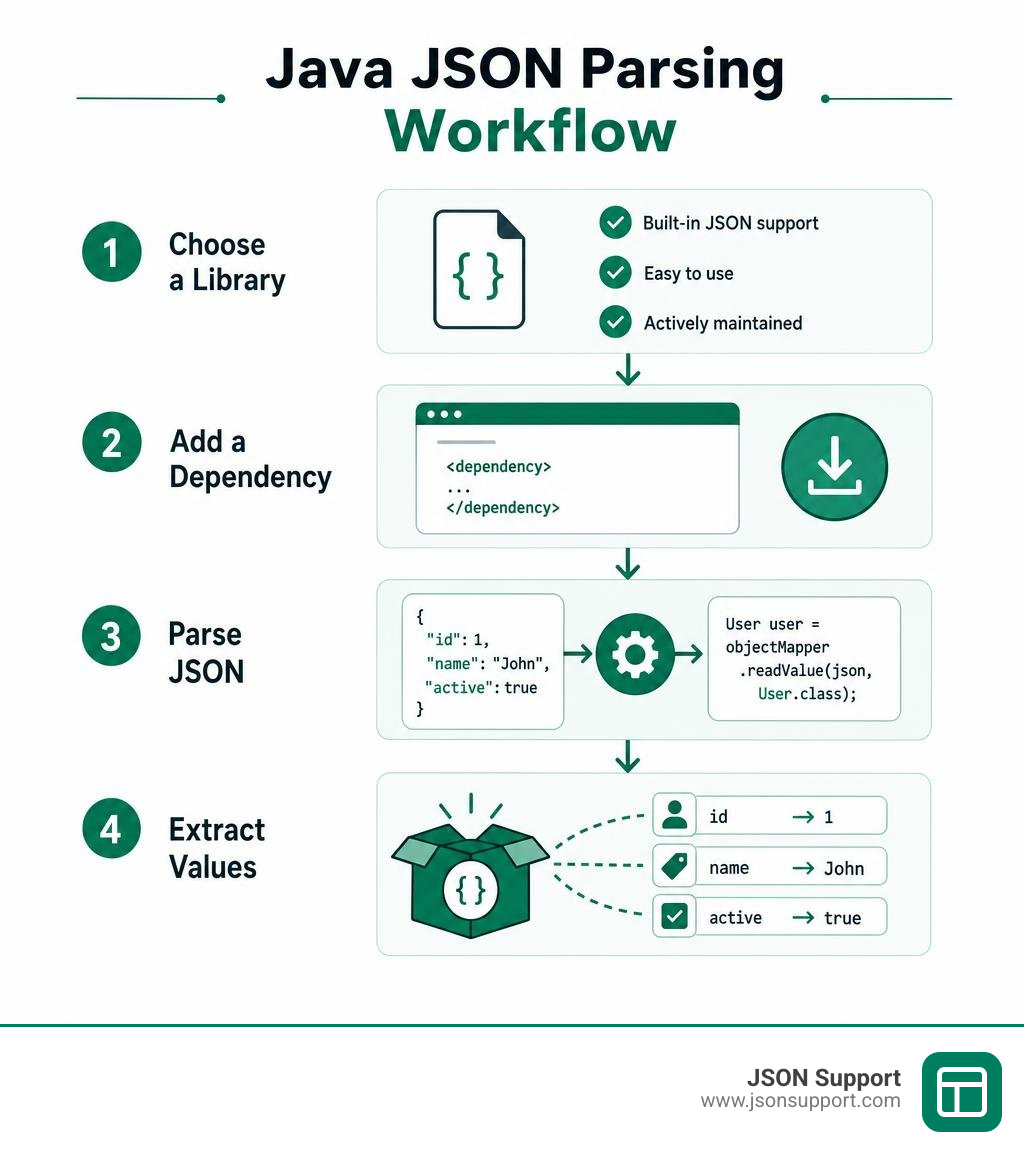
To use any of these libraries, you first need to add them to your project's build file.

For a Maven project, add the appropriate dependency to your pom.xml file. For Jackson, you will need jackson-databind. For Gson, add the gson artifact. For the reference implementation, add json.
Parsing JSON with Jackson Object Mapper
Jackson is integrated by default in Spring Boot, making it the industry standard. Its main class is the ObjectMapper.
To parse a simple JSON string into a custom Java class, you first define your target class, such as a class named User with private fields name (String) and age (int), along with their standard getters and setters.
To perform the parsing, instantiate the mapper: ObjectMapper mapper = new ObjectMapper();. Then, call the read method: User user = mapper.readValue(jsonString, User.class);. Jackson will automatically match the JSON keys to your Java class fields.
If your JSON keys do not match your Java variable names exactly, you can use the @JsonProperty annotation. For example, placing @JsonProperty("user_name") directly above your name field tells Jackson to map the JSON key user_name directly to that variable.
Java How to Parse JSON with Google Gson
Gson is famous for requiring almost zero configuration. You can learn more about its advanced features in the official Userguide.
To parse a JSON string with Gson, first instantiate the main class: Gson gson = new Gson();. You can then deserialize the string directly by calling: User user = gson.fromJson(jsonString, User.class);.
One common trap in Java is "Type Erasure." When you try to parse a JSON array into a generic collection, like a List<User>, Java loses the generic type information at runtime. Gson solves this beautifully with its TypeToken class. To safely parse a list, you define the target type like this: Type userListType = new TypeToken<ArrayList<User>>(){}.getType();. Then, pass this type object to the parser: List<User> users = gson.fromJson(jsonString, userListType);.
Lightweight Parsing with the org.json Library
If you do not want to set up custom Java classes (POJOs) and just want to extract a few values quickly, the org.json library is an exceptional tool.
To parse a JSON string, pass it directly to the constructor of JSONObject: JSONObject obj = new JSONObject(jsonString);.
Once the object is created, you can pull values out using specific, type-safe getter methods. For instance, to get a string value, use String name = obj.getString("name");. To get an integer, use int age = obj.getInt("age");.
Unlike Jackson or Gson, which fail or require annotations when keys are missing, org.json gives you explicit control. If you are not sure if a key exists, you can use obj.has("keyName") to check before reading, or use obj.optString("name", "Default Value") to safely fall back to a default value without throwing an exception.
Advanced Techniques: Streaming and Nested Structures
Real-world API payloads are rarely flat. They contain arrays, nested objects, and deep hierarchies that require careful navigation.

Java How to Parse JSON Streams with JsonParser
When memory efficiency is your top priority, you should use the standard Jakarta streaming API. You can read the official class specifications in the JsonParser (Jakarta EE Platform API) documentation.
To use the streaming parser, you first create a reader from your source stream, and then initialize the parser: JsonParser parser = Json.createParser(new StringReader(jsonString));.
The parser acts as an iterator over a stream of events. You run a loop using while (parser.hasNext()), and advance the state with JsonParser.Event event = parser.next();.
As you loop, you check the event type. If the event is KEY_NAME and the value matches your target key, you advance the parser to read the next token, which will contain the actual value. For example, if the event is VALUE_STRING, you can safely extract the data using parser.getString(). Always remember to wrap your parser in a try-with-resources block or call parser.close() to avoid resource leaks!
Handling Nested JSON Objects and Arrays
When dealing with nested objects using standard libraries, you simply chain your lookups.
Using org.json, if your JSON contains an address object which itself contains a city string, you first retrieve the nested object: JSONObject address = obj.getJSONObject("address");. From there, you extract the nested value: String city = address.getString("city");.
If your JSON contains an array, such as a list of phone numbers, you retrieve it as a JSONArray: JSONArray phoneNumbers = obj.getJSONArray("phoneNumbers");. You can then loop through the array using a standard loop: for (int i = 0; i < phoneNumbers.length(); i++) { String phone = phoneNumbers.getString(i); }.
This manual traversal is highly readable and gives you complete control over how data is extracted and validated.
Frequently Asked Questions about Parsing JSON in Java
We have compiled the most common questions developers ask when working with JSON in Java. For more deep dives, troubleshooting guides, and tutorials, explore our Blog.
Does Java have a built-in JSON parser?
No, standard Java SE does not have a built-in JSON parser. While Java SE includes built-in tools for XML, it relies on third-party libraries for JSON.
However, Java EE and Jakarta EE enterprise platforms do define standard specifications for JSON processing, known as JSON-P (JSR 353) and JSON-B (JSR 367). If you are running your application inside an enterprise application server, these APIs are available out of the box. For standard desktop or backend command-line apps, you must include an external library like Jackson or Gson.
How do you parse JSON from an API response or file?
To parse JSON from a local file, you combine a file reader with your chosen library. For example, using Gson and a standard Java FileReader, you can parse a file in one line: User user = gson.fromJson(new FileReader("user.json"), User.class);.
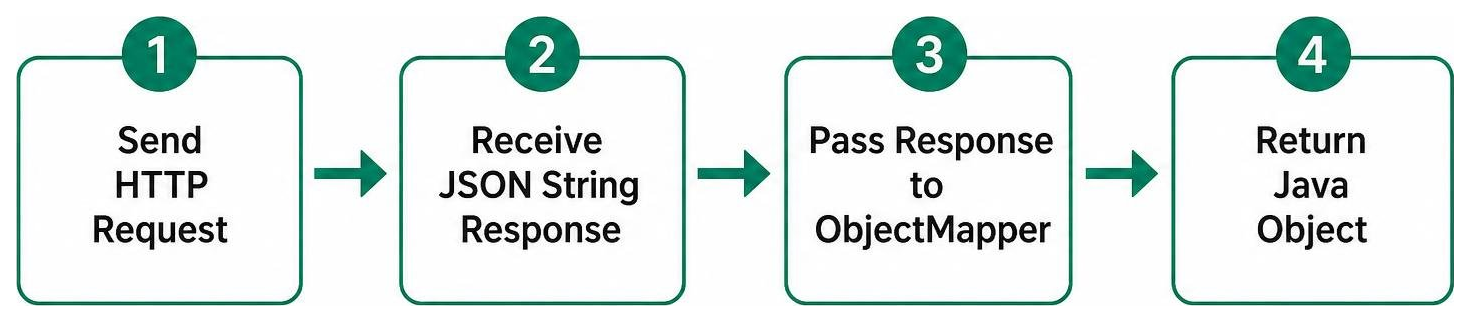
To parse JSON from an API response, you can use Java’s built-in HttpClient (introduced in Java 11). Send an asynchronous or synchronous request to retrieve the response body as a string, and then pass that string directly to your library’s parser. Here is a conceptual workflow of how this looks:
Which Java JSON library has the best performance?
In almost all independent benchmarks, Jackson is the undisputed performance leader. It has been highly optimized over the years to minimize garbage collection overhead and maximize throughput.
If you are building a high-volume microservice or a real-time data processing pipeline, Jackson is the standard choice. If you are writing a small command-line utility or an application where jar size and simplicity are more important than processing millions of payloads per second, Gson or org.json are incredibly easy to set up and run.
Conclusion
Whether you choose Jackson for raw speed, Gson for simplicity, or the streaming JsonParser for memory-constrained environments, mastering java how to parse json is an essential milestone for any developer.
Once your Java application has successfully parsed your JSON datasets, you or your business teams might need to analyze that data in a more human-readable format. Instead of writing custom Java code to export your data, you can use our secure tool.
At JSON Support, we offer a completely free, browser-based JSON-to-Excel conversion tool. Because our tool runs entirely in a serverless, client-side environment, your sensitive data never leaves your computer. There are no registration forms, no limits on file sizes, and no data is ever stored on external servers.
For fast, secure, and instant conversions, try our Convert JSON to Excel tool today!