The Best JSON Viewer Apps for Windows in 2026
July 22, 2026

Finding the right JSON viewer app for Windows can save you hours of frustration — especially when your text editor freezes trying to open a file that's more than a few megabytes.
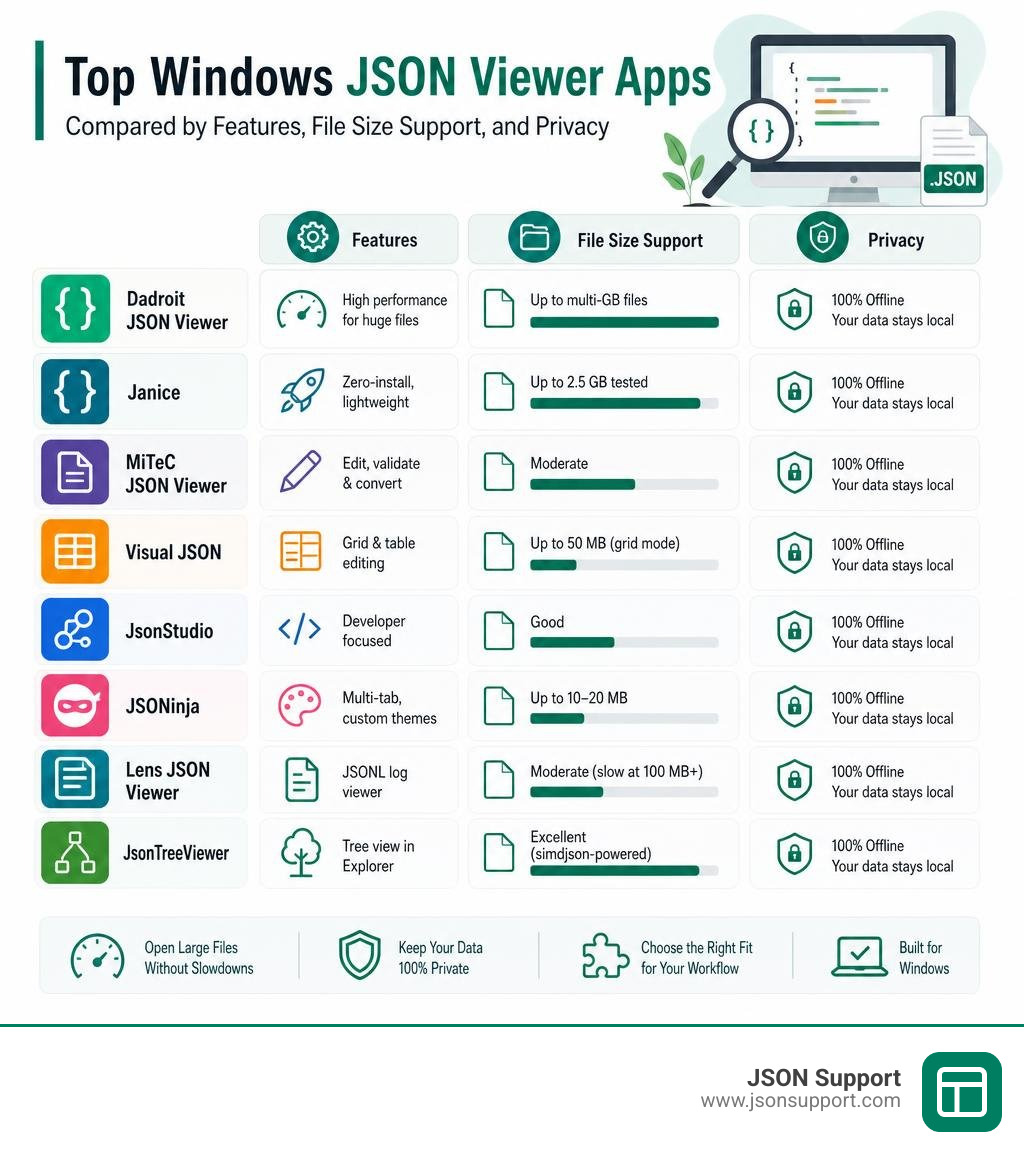
Here are the top JSON viewer apps for Windows worth knowing about:
| App | Best For | Free? | Large File Support |
|---|---|---|---|
| Dadroit JSON Viewer | Gigabyte-scale files | Yes | Excellent (2 GB/s read speed) |
| Janice | Very large files, zero-install | Yes (open-source) | Excellent (2.5 GB tested) |
| MiTeC JSON Viewer | Windows-native editing + BSON | Free/Paid | Moderate |
| Visual JSON | Grid + table editing | Yes (open-source) | Up to 50 MB for grid mode |
| JsonStudio | Developer workflow, privacy | Yes (open-source) | Good |
| JSONinja | Multi-tab, custom themes | Yes (open-source) | Up to 10–20 MB |
| Lens JSON Viewer | JSONL log files | Yes (open-source) | Moderate (slow at 100 MB+) |
| JsonTreeViewer | Windows Explorer preview | Yes (open-source) | Excellent (simdjson-powered) |
Have you ever tried opening a 100 MB JSON file only to watch your text editor freeze and crash? You're not alone. Standard tools like Notepad++ and VS Code treat JSON as plain text — which works fine for small files but falls apart fast when the data gets big or deeply nested.
The problem gets worse when the data is sensitive. Pasting an API response or a log file into an online JSON formatter means your data leaves your machine. For analysts handling customer records, financial data, or internal API responses, that's a real risk.
The good news: there are dedicated Windows JSON viewer apps built specifically for this. Some handle multi-gigabyte files without breaking a sweat. Others focus on editing, format conversion, or keeping your data completely offline.
This guide breaks down the best options so you can pick the right tool for your situation — no coding required.
Key Features and Format Compatibility in a Windows JSON Viewer
When you are hunting for the perfect json viewer app windows tool, it helps to look beyond basic text formatting. A great utility changes how you interact with data. Instead of forcing you to scroll through endless lines of curly braces, a dedicated viewer treats your data as an interactive map.
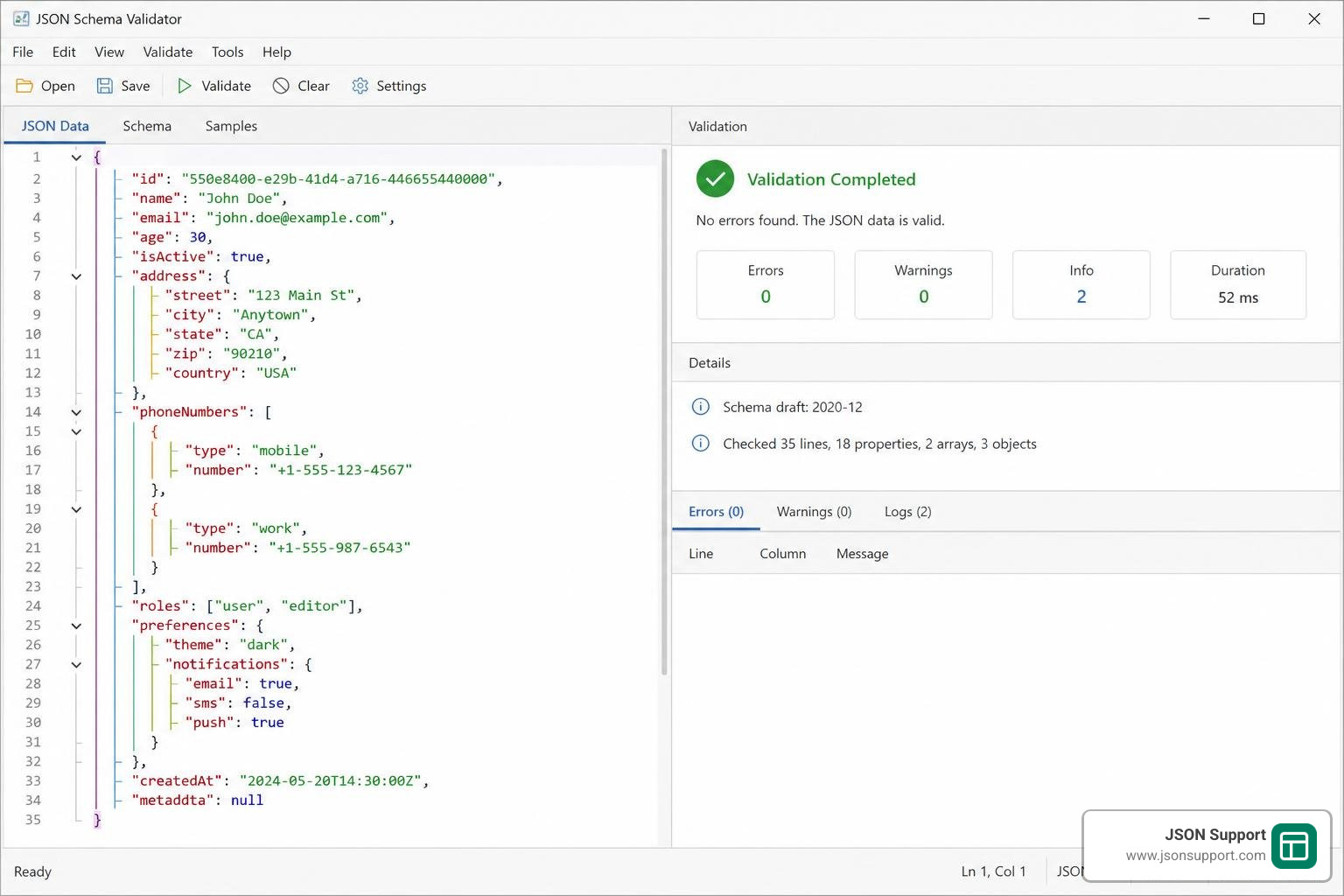
To find the right fit for your daily workflow, we recommend looking for these core features:
- Interactive Tree View: This is the bread and butter of any good viewer. It lets you collapse and expand nested objects and arrays so you do not get lost in thousands of nested elements.
- Syntax Highlighting and Rainbow Brackets: Color-coding makes it easy to distinguish keys, string values, numbers, booleans, and nulls at a glance.
- Advanced Search with RegEx: When you are looking for a specific needle in a digital haystack, standard search tools fall short. You want a viewer that supports Regular Expressions (RegEx) and asynchronous search so the interface does not freeze while scanning.
- Schema Validation: Catching structural errors early is a lifesaver. Look for tools that can validate your JSON against standard JSON schemas in real-time.
Format support is another major deciding factor. While standard JSON is everywhere, modern development relies on several variations. To understand the basics of the format itself, check out our guide on What is JSON? A Beginner's Guide to the Data Format.
A robust desktop viewer should handle these variations seamlessly:
- JSONC and JSON5: These extensions allow you to include comments (which standard JSON strictly forbids) and trailing commas, making them incredibly popular for configuration files.
- JSON Lines (JSONL / NDJSON): Commonly used for streaming data and system logs, this format stores one valid JSON object per line. If you work with system logs, you will want to understand What is NDJSON? and find a viewer that parses it efficiently.
- Cross-Format Conversion (XML and YAML): Developers often need to swap configurations between JSON, XML, and YAML. Having a built-in conversion preview saves you from copying and pasting between multiple online tools.
- Tabular Extraction: Sometimes, you just want to look at an array of objects as a spreadsheet. Excellent viewers let you extract nested fields and export them directly to CSV. To see how these formats compare, you can read more about What is a CSV File?.
Performance Benchmarks: Choosing a json viewer app windows for Large Files
The ultimate test for any json viewer app windows is how it handles massive files. Standard text editors treat files as long arrays of characters, meaning a 100 MB file requires your computer to render millions of text tokens simultaneously. This is a recipe for system freezes.
Dedicated JSON viewers solve this by using smart parsing engines. Let's look at how the top-performing Windows tools handle large datasets:
- Janice: This lightweight, zero-install desktop app is built with Go and the Fyne GUI toolkit. It is designed specifically for massive datasets. In benchmark tests on a modest laptop with just 8 GB of RAM, Janice successfully loaded a massive 2.5 GB JSON file containing 45 million elements. It renders files as alphabetical tree views, making navigation surprisingly smooth.
- Dadroit JSON Viewer: Dadroit treats JSON as a structured database rather than raw text. Because of this architectural shift, it boasts a 163x faster load speed, 2x better RAM management, and 10x faster search capabilities compared to traditional editors like VS Code or Notepad++. It can read local files at a blistering 2 GB per second and parse 130 million objects per second. Best of all, its RAM usage stays at a 1:1 ratio with the file size (meaning a 1 GB file uses exactly 1 GB of memory).
- Big JSON Tree Viewer: Built with the highly optimized C++ library rapidjson, this open-source tool is incredibly fast. It can parse and display a 250 MB file in under a second on hardware dating back to 2016.
- Huge JSON Viewer: This tool can open a 1.44 GB JSON file in about 2 minutes and 45 seconds on an Intel Core i7 machine with 16 GB of RAM. However, keep in mind its system requirements: it requires physical RAM roughly 7 times the size of the file you want to open.
- Visual JSON: A fantastic option for structured editing, though it has some guardrails for performance. Files that are 50 MB or larger automatically open in text-only mode, disabling full grid editing to keep the application responsive.
- JSONinja: This highly customizable app is perfect for files up to 10–20 MB. It can comfortably handle files with over 1 million lines, but for the best performance with larger files, we recommend using the "Collapse All" option and disabling array indices.
Best Free and Open-Source JSON Viewers for Windows
If you prefer open-source software, the Windows ecosystem has some incredible projects. Open-source tools give you full transparency over how your data is handled, which is a massive win for privacy-conscious developers.
Many modern open-source viewers are built using frameworks like Tauri and Rust. Tauri uses a Rust backend to create lightweight desktop applications with incredibly fast launch times and minimal memory footprints compared to older, heavier Electron-based apps.
If you are looking for a native, highly secure option that handles grid editing and safe XML/YAML conversions, the Meistertech-JP/Visual-JSON repository is an excellent project to explore. It features pre-save validation and writes data through temporary files to guarantee your work is never corrupted.
Lightweight json viewer app windows Options for Developers
For developers who want to avoid heavy interfaces altogether, lightweight utilities and system-level integrations are the way to go.
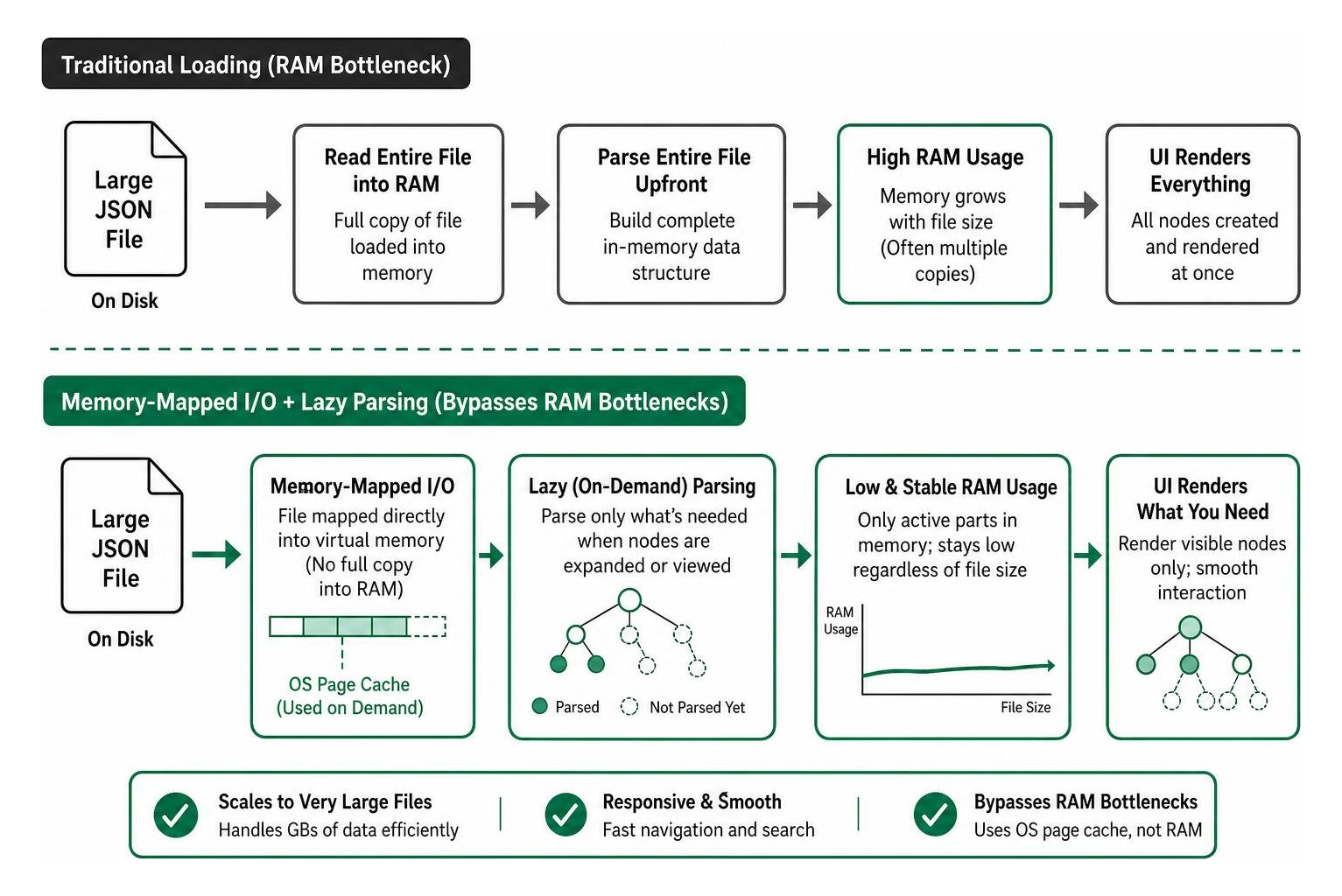
If you want to bring macOS-style instant previews to your Windows desktop, you can use Seer Pro (a quick-look tool for Windows) combined with the GitHub - ccseer/JsonTreeViewer: A plugin for Seer Pro · GitHub plugin. This allows you to select any JSON file in Windows Explorer, press the Spacebar, and instantly view its structure in a beautiful, interactive tree view. Powered by the incredibly fast simdjson C++ library, it uses memory-mapped I/O and virtual pagination to let you preview massive files instantly without even opening an app.
Another phenomenal local-first workspace is available in the sundegan/JsonStudio repository. Built with Tauri 2.0 and Rust, it features a built-in Monaco Editor (the same engine that powers VS Code), side-by-side JSON diffing, schema validation, and JMESPath querying. It runs 100% offline, making it a secure haven for sensitive development data.
Advanced json viewer app windows with Multi-Tab Support
When you are debugging complex APIs, you often need to look at multiple payloads at the same time. This is where multi-tab support becomes essential.
If you love visual customization, check out the KrunchMuffin/JSONinja repository. This tool features a gorgeous multi-tabbed interface, custom themes, and an 8-color cycling bracket system (rainbow brackets) that makes tracing nested blocks incredibly easy. It also lets you save your last 10 opened files for quick access.
For those working with streaming data, the gracece/lens-json-viewer repository is a brilliant choice. It features stream-based JSONL parsing with paginated loading (defaulting to 10 items per page) so you can browse log files without overloading your system. It also includes a Table Extraction feature, allowing you to define custom field paths and export arrays of objects directly to CSV.
Frequently Asked Questions
How do I open a 1GB+ JSON file on Windows without crashing?
To open files of this scale, avoid standard text editors and web browsers. Instead, use a 64-bit native tool like Dadroit JSON Viewer or Janice, which utilize memory-mapped I/O and lazy parsing to only load the parts of the file you are currently looking at. Alternatively, you can import the JSON file into a local MongoDB database on your machine and use a graphical interface like MongoDB Compass to query and view the data without RAM limits.
What is the difference between JSON and BSON viewers?
JSON is a plain-text, human-readable format. BSON (Binary JSON) is a binary-encoded serialization format used primarily by databases like MongoDB to store documents. BSON supports additional data types (like dates and binary data) that standard JSON does not. If you work with database backups, you will need a tool like MiTeC JSON Viewer, which natively supports viewing and editing both JSON and BSON formats.
Why does Windows Defender flag some open-source JSON viewers?
This is a common issue, especially with lightweight tools written in Go (like Janice). Go-compiled binaries occasionally trigger false-positive Trojan warnings in Windows Defender due to the way the Go compiler packages executables. If you download a trusted, open-source tool from an official GitHub Releases page, you can verify the SHA256 checksum or build it from source to ensure complete safety.
Conclusion
Choosing the right json viewer app windows comes down to your specific workflow. If you regularly handle multi-gigabyte files, dedicated engines like Dadroit or Janice will save you from constant system freezes. If you need tabbed workspaces, custom styling, and side-by-side diffing, modern Tauri-based tools like JsonStudio or JSONinja offer incredible local-first environments.
However, sometimes you don't want to install heavy desktop applications just to share data with your team. If you need to convert your structured JSON data into a clean, readable spreadsheet for non-technical stakeholders, we have a simple solution.
At JSON Support, we offer a completely free, browser-based JSON-to-Excel conversion tool. Because we prioritize your security, our tool operates in a completely data-less, serverless environment. Your data never leaves your machine, ensuring instant, private, and secure conversions without any registration or storage. Keep your technical workflows offline, and let us handle your spreadsheet conversions safely in a blink!