What Is a Java JSON Reader and When Do You Need One?
July 22, 2026
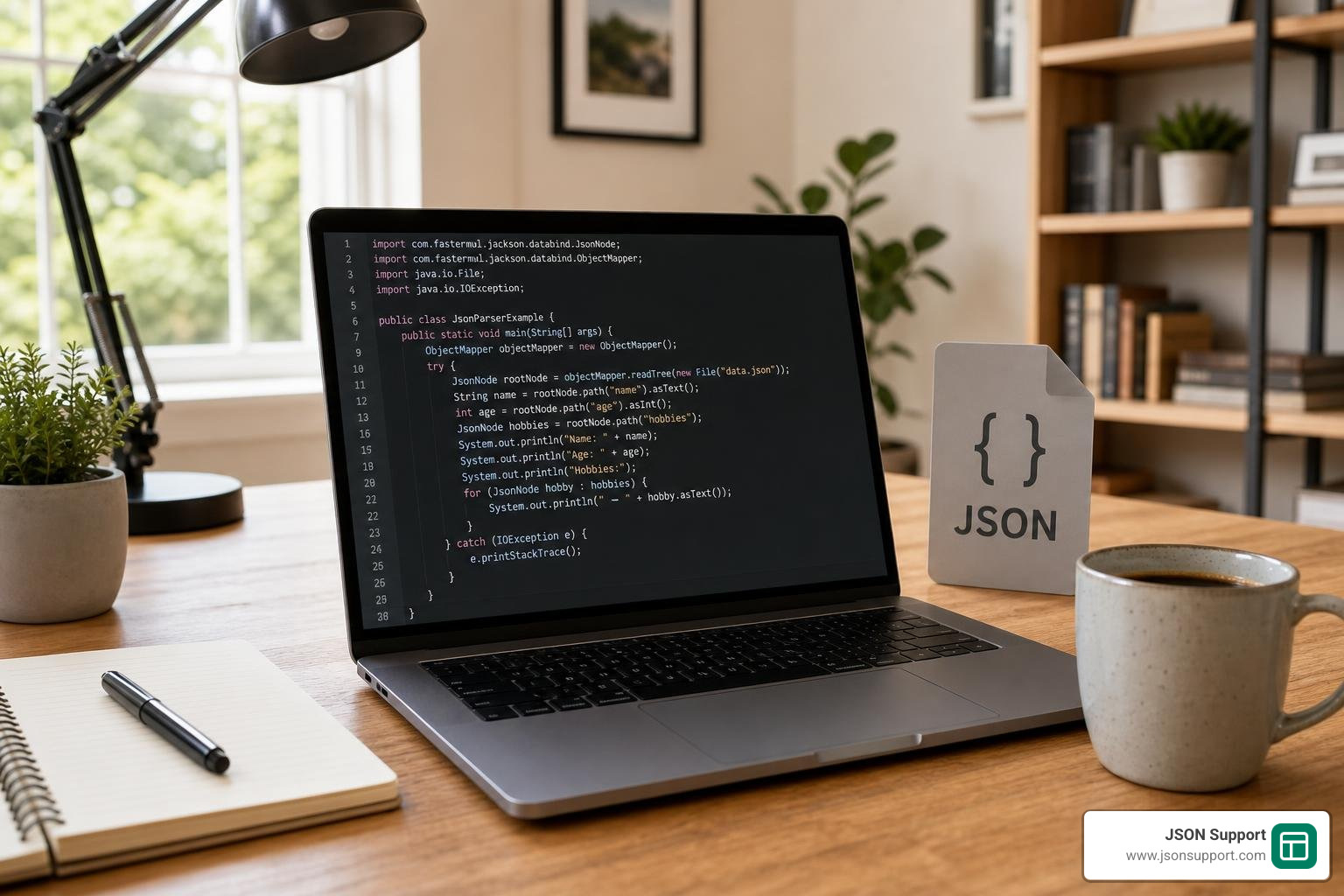
A java json reader is a built-in API that lets you parse JSON data — from strings, files, or streams — directly in Java without installing any external libraries.
Here is a quick overview of the most common ways to read JSON in Java:
| Approach | Best For | Requires External Library? |
|---|---|---|
JsonReader (javax.json / jakarta.json) |
Standard Java EE / Jakarta EE apps | No |
JsonParser (javax.json.stream) |
Large files, low memory | No |
Jackson ObjectMapper |
Fast POJO mapping, enterprise apps | Yes |
Gson JsonReader |
Lightweight streaming | Yes |
org.json JSONParser |
Simple, quick parsing | Yes |
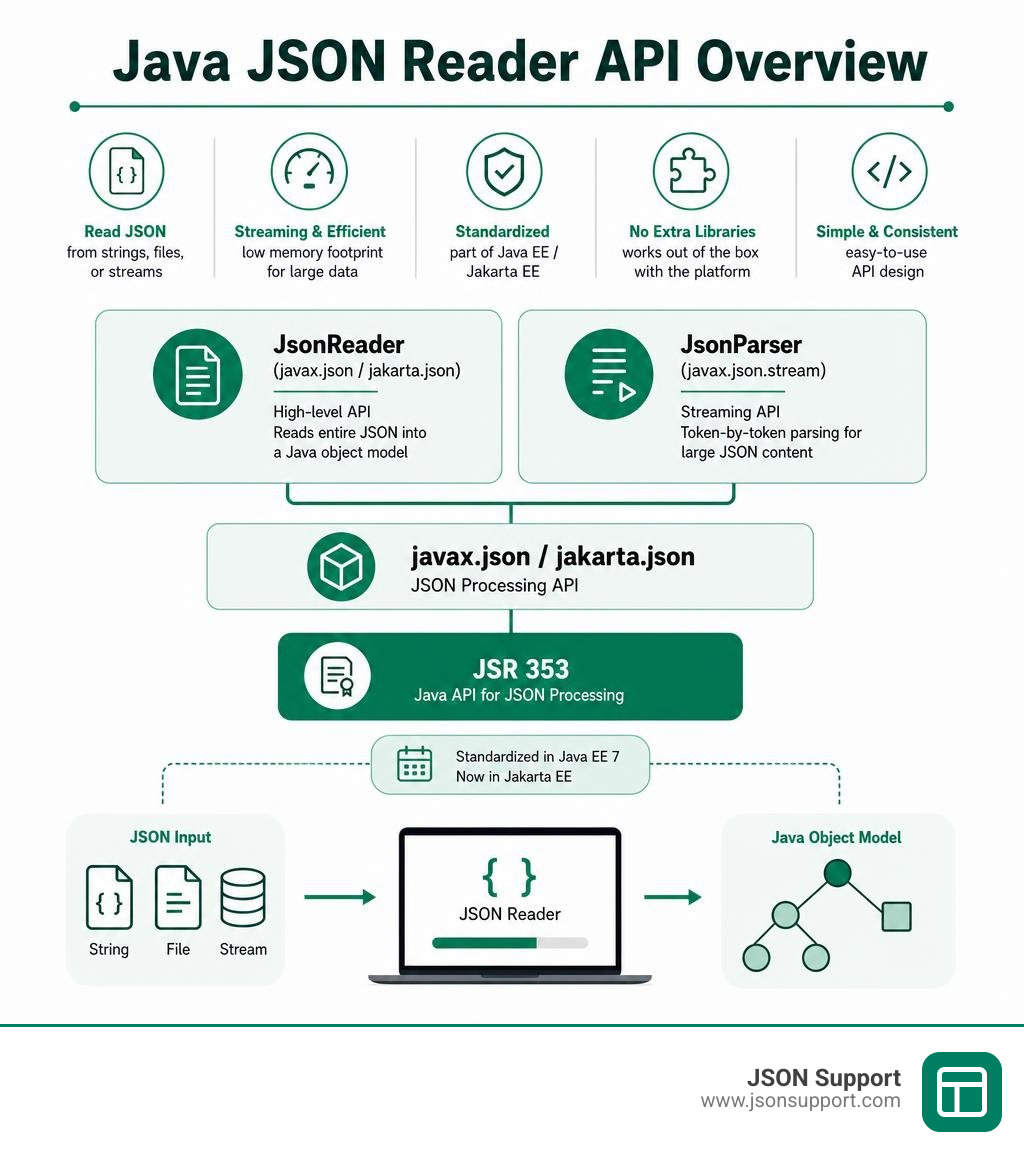
Java's built-in JSON support lives in the javax.json package (now jakarta.json in Jakarta EE). It was standardized under JSR 353 as part of Java EE 7. This means you can parse JSON without pulling in heavy third-party dependencies at all.
That said, most Java developers do reach for third-party tools. Jackson is the most widely used Java JSON library, with over 10,000 dependent projects on Maven Central. Gson follows as a close second. The reason is simple: they offer faster performance and easier object mapping out of the box.
But if you are working in a Java EE or Jakarta EE environment, or you just want a clean, dependency-free solution, the built-in JsonReader interface is a solid, underappreciated option worth knowing.
This guide walks you through exactly how it works.
Understanding the Java JSON Reader API
To work with JSON directly using standard enterprise specifications, we rely on the javax.json.JsonReader interface. It provides a straightforward, high-level way to read JSON objects and arrays from an input source.
Unlike low-level streaming parsers, this interface is designed around the Object Model. This means it reads the entire JSON source and maps it into a tree of Java objects representing the JSON structure.
If you are new to JSON or need a quick refresher on how JSON structures are formatted, check out our guide on What is JSON? A Beginner's Guide to the Data Format.
The standard Java JSON API has transitioned over time. Originally introduced in Java EE 7 as javax.json, the API is now part of Jakarta EE under the jakarta.json namespace. This transition occurred when Oracle moved Java EE to the Eclipse Foundation. For modern enterprise projects developed in 2026, you should look to the updated JsonReader (Jakarta EE Platform API) documentation to stay current with modern standards.
Creating a Java JSON Reader Instance
You do not instantiate a JsonReader directly because it is an interface. Instead, you use the helper class javax.json.Json (or jakarta.json.Json) to create a reader instance from various input sources.
The Json class provides static factory methods like createReader to handle different inputs. Here is how you can set up a reader for different scenarios:
- Reading from a String: If you have a raw JSON string, wrap it in a
StringReader. For example, you can create a reader by executing:JsonReader reader = Json.createReader(new StringReader(jsonString)); - Reading from a File: To read a JSON file from disk, combine a
FileInputStreamor aFileReaderwith the factory. For instance:JsonReader reader = Json.createReader(new FileInputStream("config.json")); - Reading from an InputStream: If you are pulling JSON from a network request or a resource stream, you can pass the
InputStreamdirectly:JsonReader reader = Json.createReader(inputStream);
These simple methods make it incredibly easy to start reading JSON payloads without configuring complex setups.
The Role of JsonReaderFactory
While calling Json.createReader is great for quick, one-off tasks, it is not the most efficient approach if your application needs to parse JSON repeatedly. Every time you call Json.createReader, the JVM has to look up the default provider and configure a new reader engine from scratch.
To optimize performance, standard Java provides the JsonReaderFactory interface. This factory is the preferred way to create multiple reader instances that share the same configuration.
You can create a single factory instance at application startup like this: JsonReaderFactory factory = Json.createReaderFactory(configMap); (where configMap is an optional map of configuration properties). Once created, you can reuse this factory across your application to spin up new readers quickly and cheaply using factory.createReader(inputStream). This reduces bootstrap overhead and keeps your application running smoothly under high loads.
For more details on standard implementation files, you can inspect the official source code in the api/src/main/java/javax/json/JsonReader.java repository.
Reading JSON Structures and Handling State
Once you have initialized a java json reader instance, you need to extract the data. The interface provides three primary parsing methods, each designed for a specific root-level JSON structure:
readObject(): Use this method when your JSON input starts with curly braces{}representing a JSON object. It parses the stream and returns aJsonObject.readArray(): Use this method when your JSON input starts with square brackets[]representing a JSON array. It parses the stream and returns aJsonArray.read(): This is a generic method that returns aJsonStructure(which is the parent interface for bothJsonObjectandJsonArray). Use this when you do not know the root structure of the incoming JSON beforehand.
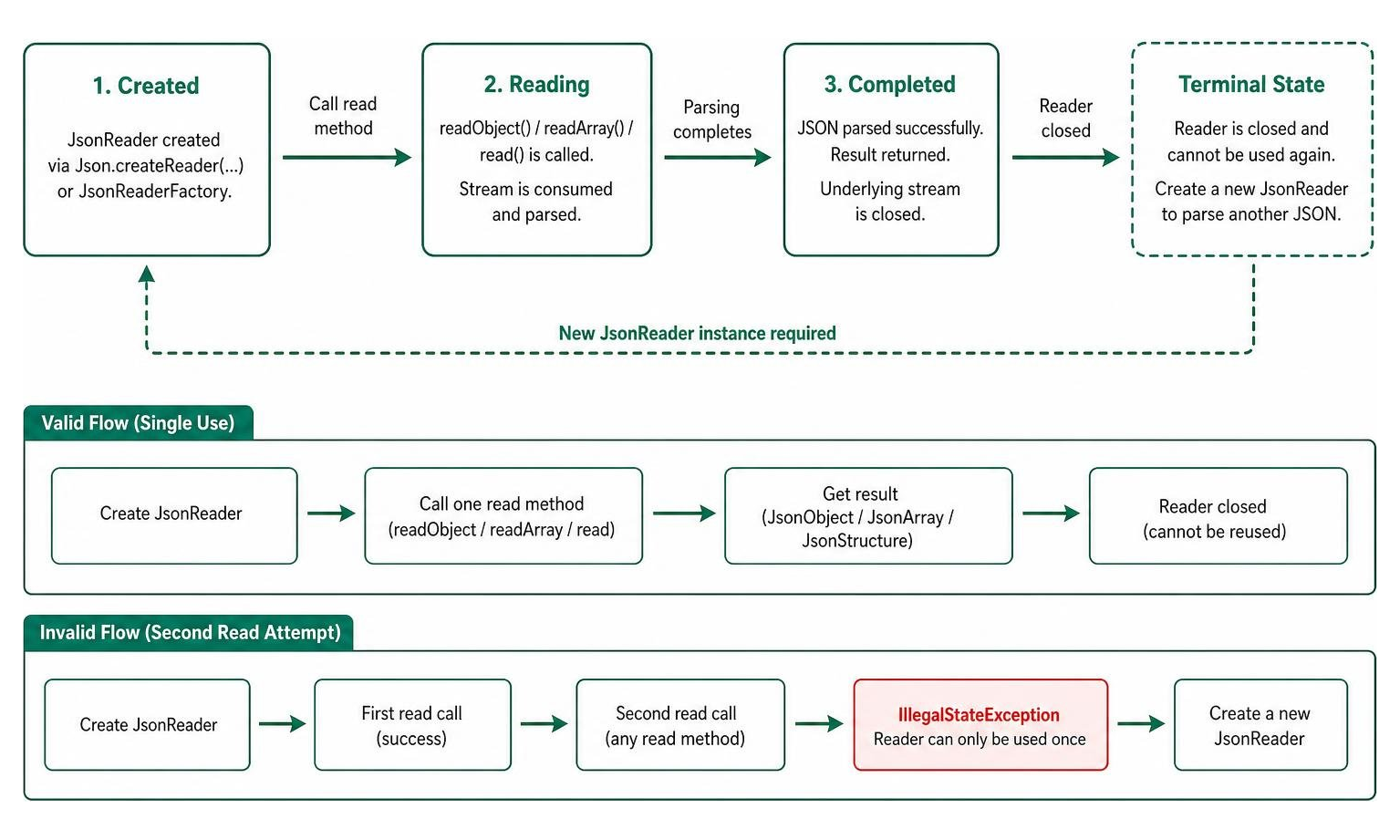
A critical rule of standard Java JsonReader instances is that each read method can only be called once per reader instance.
But why is this the case? The reader functions as a forward-only stream parser under the hood. Once you call a read method, the entire underlying stream is consumed, parsed, and closed. If you attempt to call a read method a second time on the same instance, the reader will immediately throw an IllegalStateException. To parse another JSON document, you must instantiate a completely new JsonReader instance.
Navigating Nested JSON Objects and Arrays
Most real-world JSON is not flat; it consists of deeply nested objects and arrays. Because the standard API maps the input into an in-memory object model, navigating these nested structures is incredibly intuitive.
Once you have called readObject() and obtained a JsonObject, you can traverse down the tree using specialized getter methods:
getJsonObject(String name): Retrieves a nested JSON object associated with the specified key.getJsonArray(String name): Retrieves a nested JSON array associated with the specified key.getString(String name),getInt(String name),getBoolean(String name): Retrieve primitive values directly.
For example, if you have a JSON object representing a user with a nested "address" object and a "phoneNumbers" array, you can access the city of the address by chaining: String city = rootObject.getJsonObject("address").getString("city");
Similarly, you can retrieve the first phone number by calling: String firstPhone = rootObject.getJsonArray("phoneNumbers").getString(0);
This object model approach keeps your traversal code clean and readable, though it requires you to know the schema structure in advance.
Resource Management and Exception Handling
Because a JsonReader relies on underlying system resources like files or network streams, proper resource management is vital to prevent memory leaks and file lock issues.
The JsonReader interface extends AutoCloseable. This means the absolute best practice for managing resources is to wrap your reader in a try-with-resources block. When the block exits, the reader's close() method is called automatically, which safely closes both the reader and the underlying input source.
During the parsing process, several exceptions can be thrown, and you should design your catch blocks to handle them specifically:
JsonParsingException: This is a specialized runtime exception thrown when the reader encounters malformed JSON that violates standard syntax rules.JsonException: This is a general runtime exception thrown for broader I/O errors or standard API configuration issues.IllegalStateException: As mentioned earlier, this is thrown if you try to call a read method on a reader that has already been consumed or closed.
If you have general questions about handling common JSON parsing bugs, you can refer to our FAQ page.
Comparing JsonReader and JsonParser
When working with standard Java APIs, you have two primary options for reading JSON: the object model JsonReader and the streaming model JsonParser. Choosing the right one depends entirely on your performance requirements and memory constraints.
| Feature | JsonReader (Object Model) |
JsonParser (Streaming Model) |
|---|---|---|
| Parsing Style | Reads the entire document into memory | Processes token-by-token (pull model) |
| Memory Footprint | High (grows with JSON file size) | Extremely low (constant overhead) |
| Navigation | Random access (can navigate back and forth) | Forward-only (cannot go backward) |
| Programming Model | Simple, intuitive object trees | Event-based loop (requires tracking state) |
| Best For | Small to medium payloads, configuration files | Massive datasets, high-throughput systems |
The standard streaming parser is defined by the JsonParser (Jakarta EE 8 Specification APIs) interface. It uses a pull-parsing model where your code explicitly advances the parser state by calling next().
If you are dealing with multi-gigabyte JSON log files, loading the entire file into memory using JsonReader will quickly trigger an OutOfMemoryError. In those resource-constrained scenarios, the token-by-token streaming approach of JsonParser is the only viable choice. However, for standard REST API responses and small configuration files, JsonReader is far easier to write and maintain.
Standard API vs. Third-Party Libraries
While standard Java APIs are great for keeping your project free of external dependencies, the wider Java ecosystem heavily favors third-party libraries. If you are building a modern, high-performance microservice, understanding how standard JsonReader stacks up against Jackson, Gson, or JSON.simple is crucial.
You can learn more about our team and our focus on data productivity on our About page.

Java JSON Reader vs. Third-Party Libraries
Let's look at how these libraries compare across performance benchmarks, dependencies, and ease of use:
- Jackson: Jackson is the absolute king of the Java JSON ecosystem. It is incredibly robust and performs 5 to 6 times better than org.json and more than twice as well as GSON in serialization and deserialization benchmarks. In a benchmark of 1 million runs, Jackson completed the tasks in 6.5–7 seconds, compared to 20–21 seconds for org.json. It also supports direct POJO mapping, meaning you can convert JSON directly to a Java class with a single line of code. For details on Jackson's features and core modules, check out the README.md at main · FasterXML/jackson .
- Gson: Developed by Google, Gson is the second most popular library. It is highly praised for its simplicity and lightweight nature. If you need low-level streaming control within Gson, you can use Gson's own stream-based reader, which you can explore in the gson/src/main/java/com/google/gson/stream/JsonReader.java at master · google/gson source file or the JsonReader (Gson 2.8.8 API) documentation.
- JSON.simple: This library is extremely lightweight and requires absolutely minimal dependencies. It is perfect for tiny, simple projects where you want basic parsing without any external bloat, though it lacks the advanced data-binding features of Jackson or Gson.
If you want to write standard, specifications-compliant code that will run on any Jakarta EE application server without bundling extra libraries, standard JsonReader is excellent. But if raw speed, custom annotations, and automatic object mapping are your priorities, Jackson or Gson are the clear winners.
Frequently Asked Questions about Java JSON Parsing
Why does JsonReader throw an IllegalStateException when calling read twice?
As a stream-based reader, JsonReader consumes the underlying stream as it parses the JSON data. Once a read method like readObject() or readArray() is called, the stream is fully drained and closed. Because the state is validated to ensure stream integrity, any subsequent read attempt on that same reader instance throws an IllegalStateException. You must create a new reader instance for every new JSON payload you parse.
What is the difference between javax.json and jakarta.json?
The difference is purely a namespace transition. The javax.json package was part of the original Java EE specification managed by Oracle. Following the transition of Java EE to the Eclipse Foundation, the platform was rebranded as Jakarta EE. To comply with licensing agreements, all standard enterprise packages were renamed from the javax namespace to jakarta. Functionally, javax.json and jakarta.json are almost identical, but modern projects running in 2026 should use jakarta.json.
How do you handle extremely large numbers to prevent precision loss?
JavaScript (and standard JSON by extension) represents numbers using double-precision floats, which can cause precision loss for very large integers (above 9,007,199,254,740,993). In Java, to prevent this precision loss when using libraries like Jackson or Gson, you should read these large numbers as String values or use BigDecimal during parsing. Both Jackson and Gson permit numeric values to be safely read as Strings to preserve exact mathematical precision.
Conclusion
Standard Java JSON readers provide a reliable, dependency-free way to parse and traverse JSON structures within standard Java and Jakarta EE environments. By understanding how to manage reader factories, traverse nested objects, and properly close resources, you can build highly compliant enterprise applications.
Once you have parsed your JSON data, sharing it with non-technical stakeholders or analyzing it in tabular format can be a challenge. We can help with that.
At JSON Support, we offer a free, browser-based JSON-to-Excel conversion tool. It operates in a completely data-less, serverless environment, meaning your sensitive data never leaves your browser. It is fast, highly secure, and requires absolutely no registration. If you need to instantly turn complex parsed JSON structures into clean, organized spreadsheets, try out our secure conversion tool today!