The Best Free JSON Viewer Downloads Available Right Now
July 22, 2026

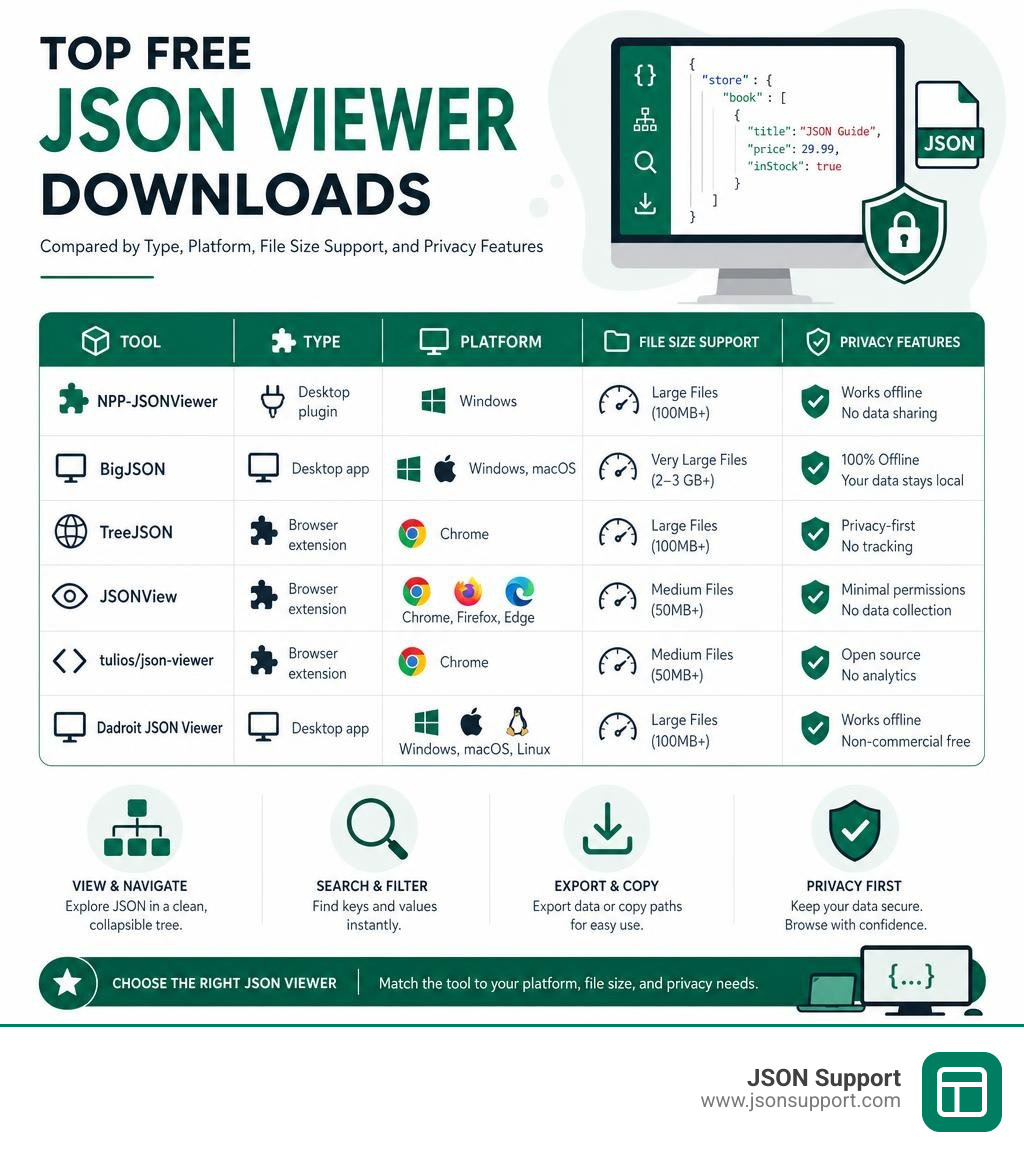
Looking for a json viewer free download? Here are the top options:
| Tool | Type | Platform | Best For |
|---|---|---|---|
| NPP-JSONViewer | Desktop plugin | Windows | Notepad++ users |
| BigJSON | Desktop app | Windows, macOS | Large files (2–3 GB+) |
| TreeJSON | Browser extension | Chrome | Privacy-first viewing |
| JSONView | Browser extension | Chrome, Firefox, Edge | Lightweight browsing |
| tulios/json-viewer | Browser extension | Chrome | Customizable formatting |
| Dadroit JSON Viewer | Desktop app | Windows, macOS, Linux | Multi-platform (non-commercial free) |
If you work with JSON data — API responses, database exports, log files — you already know the problem. Raw JSON looks like a wall of brackets and quotes. It is nearly impossible to read without the right tool.
A good JSON viewer turns that mess into a clean, collapsible tree you can actually navigate. And the best part? You do not need to pay for one.
There are solid free options for every situation: desktop apps, browser extensions, and text editor plugins. Some work offline so your data never leaves your machine. Others open in seconds right inside your browser.
This guide cuts through the noise and shows you exactly which free JSON viewer to download based on your platform, file size, and privacy needs.
Introduction
As developers, data analysts, and QA engineers, we deal with JavaScript Object Notation every single day. When you open a raw data file, you are greeted by an unreadable mass of curly braces, brackets, colons, and minified text. Staring at this raw wall of data slows down your productivity and makes debugging a nightmare.
A dedicated JSON viewer solves this problem completely. It takes that chaotic block of text and instantly transforms it into an interactive, color-coded, hierarchical tree structure. With a single click, you can collapse entire objects, search for nested keys, validate syntax errors, and export clean subsets of your data.
In this comprehensive guide, we will explore the absolute best options for a json viewer free download in 2026. Whether you need a lightning-fast local desktop app, a seamless browser extension, or a powerful text editor plugin, we have analyzed the top-performing, secure, and completely free tools to help you work smarter.
What is a JSON Viewer and Why Do You Need One?
Before looking at the best tools, let us establish what a JSON viewer actually does and why it is an essential part of your modern development stack.
At its core, a JSON viewer is a specialized utility designed to parse, format, and display structured data in a human-readable format. While you can technically open a JSON file in any basic text editor like Notepad or TextEdit, these programs treat the data as flat, unformatted string characters. They do not understand the underlying syntax.
To understand why a dedicated tool is necessary, it helps to understand the format itself. If you are new to this data structure, read our guide on What is JSON? A Beginner's Guide to the Data Format. Additionally, if you are working with streaming data or line-delimited records, you will want to read about What is NDJSON? to see how modern logging systems handle sequential objects.
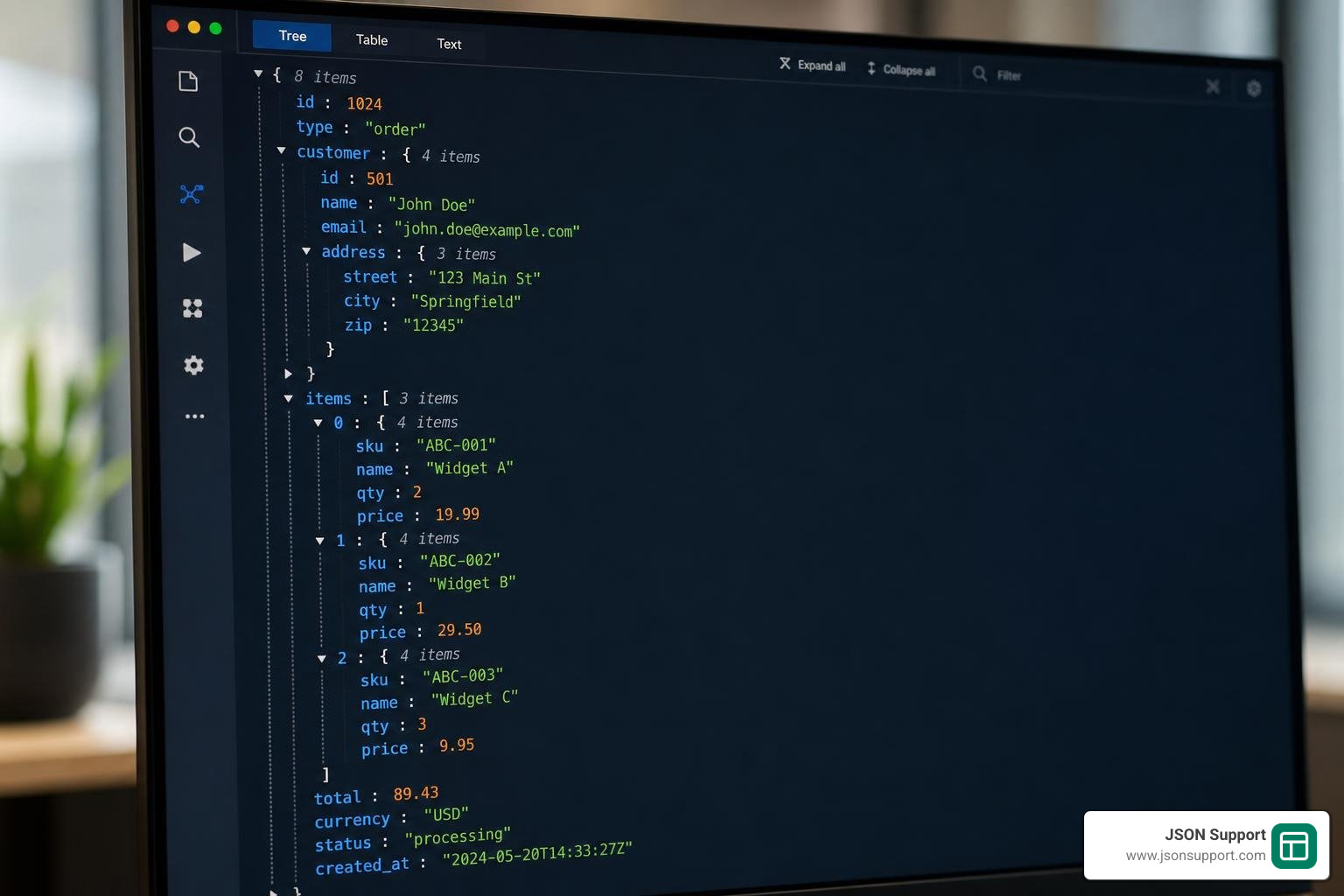
A high-quality free JSON viewer provides several critical benefits:
- Syntax Highlighting: It applies distinct colors to keys, string values, numbers, booleans, and null values. This visual distinction makes it incredibly easy to scan a file and locate specific data points in seconds.
- Collapsible Tree Nodes: Nested structures, complex child objects, and massive arrays can be collapsed or expanded with a single click. This prevents information overload by letting you hide the sections of the dataset you are not currently analyzing.
- Built-in Validation: If your JSON file is missing a trailing comma, has mismatched brackets, or contains unquoted keys, a viewer will flag the exact line number and error type. This saves you from running broken data through your application.
- Advanced Search Capabilities: Standard text find-and-replace tools search for raw text strings across the entire document. A specialized viewer allows you to perform targeted searches, matching specifically against keys or values, and even using regular expressions.
- Data Structure Metrics: Many viewers automatically calculate array lengths, object property counts, and file sizes, giving you immediate metadata insights without needing to write custom code.
By keeping these features in mind, you can select a tool that fits perfectly into your daily workflow.
Top Options for a JSON Viewer Free Download
When you search for a json viewer free download, you will find three main categories of tools: desktop applications, browser extensions, and text editor plugins. Each category has its own distinct advantages depending on your operating system, file sizes, and security constraints.
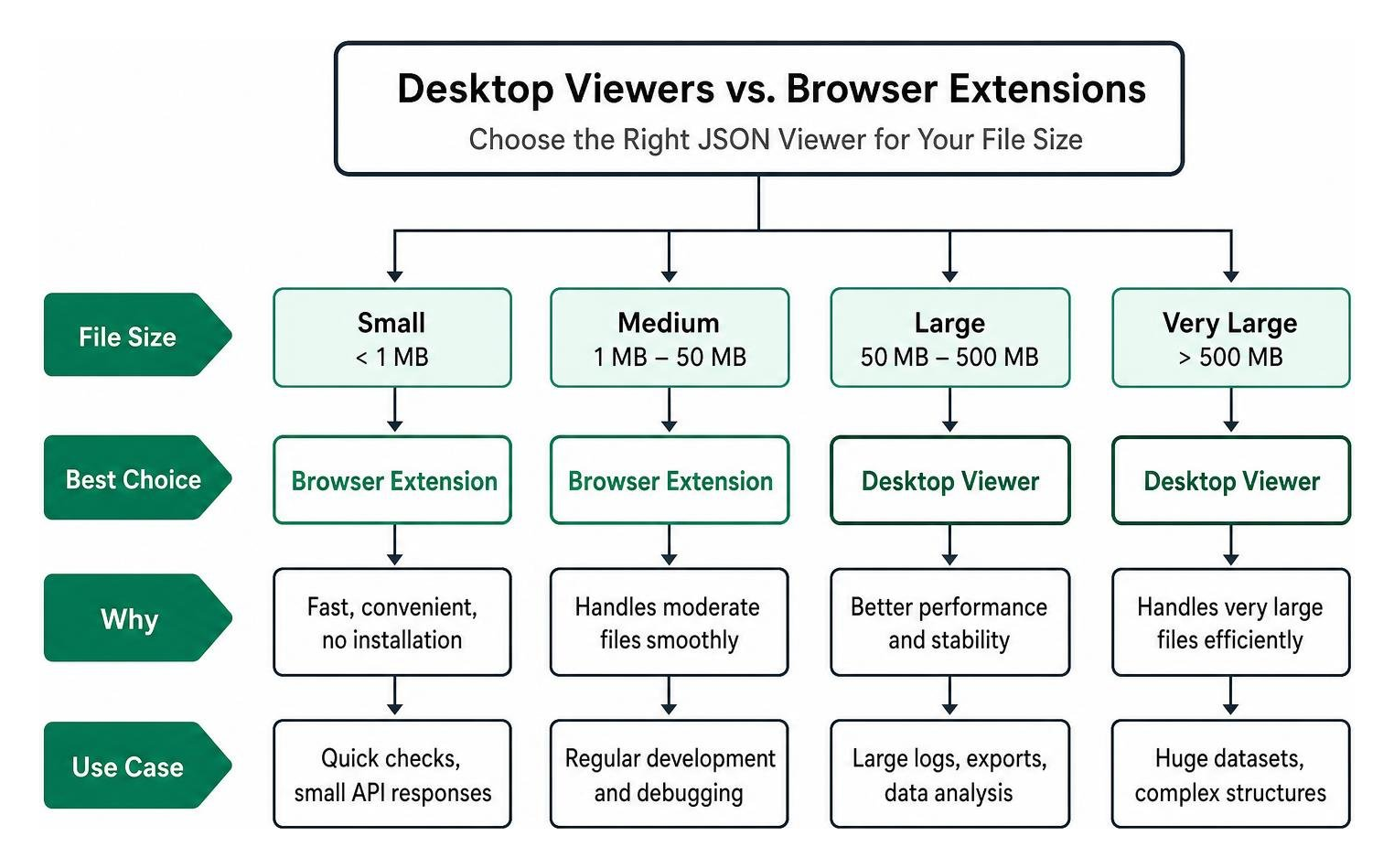
Let us dive deep into the absolute best free tools available in 2026 across these categories.
NPP-JSONViewer: The Best JSON Viewer Free Download for Notepad++
For developers who use Windows, Notepad++ remains one of the most popular, lightweight text editors in the world. If you already use it, you do not need to download a separate desktop application to format your data. Instead, you can install the excellent NPP-JSONViewer plugin.
The NPP-JSONViewer/JSON-Viewer plugin is a highly active open-source project with 865 stars and 166 forks on GitHub. It integrates directly into your Notepad++ interface, allowing you to format, validate, and explore your JSON data completely offline.
One of the standout features of NPP-JSONViewer is its integration of the rapid, high-performance RapidJSON parsing engine. This allows the plugin to parse and format local files quickly and efficiently. It can also handle non-standard JSON features like trailing commas, comments, and JavaScript literals like NaN or Infinity, depending on how you configure the parser settings.
How to Install and Use NPP-JSONViewer:
- Download the NPPJSONViewer.dll file from the official releases page on GitHub. Make sure you select the correct version (x64 or x86) to match your Notepad++ installation.
- Open your file explorer and navigate to your Notepad++ installation directory (typically C:\Program Files\Notepad++\plugins).
- Create a new folder named NPPJSONViewer inside the plugins directory, and paste the downloaded DLL file directly into it.
- Restart Notepad++.
- To use the viewer, simply open or paste a JSON string, select the text, and use the default keyboard shortcut Ctrl+Alt+Shift+J to instantly format the data into an interactive tree view.
By moving your formatting offline with this plugin, you eliminate the risk of uploading sensitive API keys, customer credentials, or proprietary business logic to insecure online web tools.
BigJSON: A High-Performance JSON Viewer Free Download for Large Files
Standard text editors and basic browser extensions work perfectly for small files, but they completely fall apart when you try to open massive database exports or multi-gigabyte server logs. Standard editors attempt to parse the entire file into active heap memory all at once. This causes a 2 GB file to balloon into 15 to 30 GB of RAM usage, freezing your operating system and crashing the editor.
If you regularly work with large datasets, your best json viewer free download option is BigJSON (also known as huge-json-viewer). BigJSON is a completely free, open-source desktop GUI tool licensed under the highly permissive MIT License. It serves as an incredibly powerful, unrestricted alternative to paid tools like Dadroit (which is free for non-commercial use, but charges $98 to $198 per year for commercial licenses).
BigJSON achieves its mind-boggling performance through three core engineering strategies:
- Memory-Mapping (mmap): Instead of loading the entire file into your computer's RAM, BigJSON memory-maps the file directly from your storage drive, loading pages of data on demand as you scroll.
- Streaming Tokenization: It runs a single, ultra-fast streaming pass over the file to build a highly compact flat index of byte offsets. This index takes up only about 23 bytes per JSON node, keeping total memory overhead under 1.5 to 2 times the raw file size.
- Virtualized Tree Rendering: It only renders the specific rows that are currently visible on your screen. This bypasses browser element-height limits and prevents rendering lag, allowing you to scroll through millions of nested rows instantly.
With BigJSON, you can open a 2 to 3 GB JSON file in approximately 3 seconds. It also includes advanced developer features like regex-based search, jq-style path copying, and subtree exporting. If you need to transform these large datasets into other formats for your team, you can learn How to Convert JSON to CSV to make your raw database exports much easier to analyze in standard spreadsheet programs.
TreeJSON and Browser Extensions for Instant Viewing
If you spend your day testing REST APIs, reading webhooks, or inspecting GraphQL responses, downloading a standalone desktop app might feel like overkill. You want to view your data instantly inside your browser without manual copy-pasting.
The best solution is a modern browser extension that automatically intercepts JSON responses and formats them inline. However, you must choose your extensions carefully. In early 2026, a popular JSON formatting extension with over 2 million users went closed-source and began injecting third-party tracking scripts into user pages. This highlighted the critical need for open-source, privacy-first tools.
This event led to the creation of TreeJSON, a modern, secure, and completely open-source extension. The TreeJSON — JSON Viewer, Tree View, YAML & XML Formatter - Chrome Web Store extension is only 202KiB in size, supports 52 languages, and is built on Manifest V3. This ensures long-term compatibility with Google Chrome's modern extension architecture. Most importantly, TreeJSON features zero telemetry, zero outbound network requests, and zero third-party scripts. It runs entirely locally inside your browser sandbox.
Beyond TreeJSON, there are two other highly respected, open-source browser extensions you can download for free:
- JSONView (by bhollis): Boasting 1,669 stars and 231 forks on GitHub, this is one of the most popular, minimalist browser extensions available. It is designed to format, highlight, and collapse JSON documents cleanly without unnecessary feature bloat. You can explore the source code directly at bhollis/jsonview .
- tulios/json-viewer: With 3,455 stars and 731 forks, this is an incredibly customizable extension for Chrome. It features 27 built-in themes, an omnibox shortcut (type
json-viewerand press TAB to paste and format text), a scratchpad for temporary editing, and deep integration with the browser console. You can find the repository at tulios/json-viewer .
These extensions turn your web browser into a powerful, localized development environment, giving you the best of both worlds: speed and security.
How to Safely Handle Large Datasets and Privacy Concerns
While online web tools are highly convenient, they introduce major security risks when handling sensitive corporate or personal data. Many free online formatters require you to paste your raw data into a text box, which is then sent to their remote web servers. If these platforms do not have strict security measures, your data can be cached, stored, or even exposed publicly. In fact, some online tools make your saved JSON public by default unless you manually log in and create a private account.
If you are dealing with proprietary business logic, customer database backups, or private API keys, you should always parse and format your files locally using offline tools like NPP-JSONViewer, BigJSON, or security-focused browser extensions like TreeJSON.

If your ultimate goal is to share this structured data with non-technical team members, managers, or business analysts, raw JSON is rarely the right format. They will struggle to read it, even with a viewer.
To bridge this gap, you should convert your structured data into a flat spreadsheet format like Microsoft Excel or CSV. To do this safely without compromising your privacy, read our How to Convert JSON to Excel: A 2026 Guide to learn about secure, browser-based conversion methods. If you are unsure which file format is best for your specific business requirements, check out our detailed analysis on Converting JSON to Excel vs CSV: Which Should You Use? to make an informed choice.
Frequently Asked Questions About JSON Viewers
We have compiled and answered the most common questions developers and data analysts ask when looking for a free JSON viewer.
Can I view JSON files directly in my browser without downloading software?
Yes, absolutely! Modern web browsers can render JSON natively, but they often display it as a flat, unformatted string. By installing a lightweight browser extension like TreeJSON or JSONView, your browser will automatically intercept any URL ending in JSON or served with the application/json MIME type, formatting it into an interactive tree instantly.
If you are a web developer looking to build a custom viewer directly into your own web applications, you can use open-source libraries like the @andypf/json-viewer npm package. This lightweight library has 10,000 weekly downloads and zero external dependencies. It is built using Web Components and Shadow DOM, which makes it completely framework-agnostic. You can easily embed it as a custom HTML element in vanilla JavaScript, React, Angular, or Vue without worrying about style leakage.
How do JSON viewers handle massive multi-gigabyte files?
Standard editors crash on large files because they attempt to build an in-memory object tree for the entire document. High-performance JSON viewers like BigJSON handle multi-gigabyte files by using memory-mapping (loading only the visible portions of the file into active memory) and virtualized rendering (only drawing the specific rows currently visible on your screen). This keeps RAM usage incredibly low and prevents the software from freezing.
Are there any security risks associated with online JSON viewers?
Yes. When you paste data into an online viewer, you are uploading your information to a remote server. If that data contains personally identifiable information (PII), financial records, or secret API keys, you could be violating data privacy regulations like GDPR or HIPAA. To keep your data secure, always use local, offline desktop applications or browser extensions that run 100% client-side without sending outbound network requests.
Conclusion
Finding the perfect json viewer free download depends entirely on your specific workflow. If you are a Windows developer who already uses Notepad++, installing the NPP-JSONViewer plugin is a fantastic, lightweight way to format data offline. If you regularly handle massive multi-gigabyte database exports, the open-source BigJSON desktop application will open your files in seconds without crashing your computer. And if you want instant, everyday formatting directly inside your browser, installing a privacy-first extension like TreeJSON is the safest and most convenient option.
If you are looking for an easy way to share your structured JSON data with non-technical colleagues, standard viewers are only half the battle. To make your data truly accessible, you need to turn it into a familiar spreadsheet format.
At JSON Support, we offer a completely free, browser-based JSON-to-Excel conversion tool. Our converter runs entirely on your local machine using a serverless architecture. This means your sensitive files are never uploaded to a remote server, stored, or shared. You get instant, private, and secure conversions directly in your browser with zero registration required.
Try our free conversion tool today and bridge the gap between your application data and business analysis!