When Your JSON Looks Like Gibberish: What a JSON Format Reader Actually Does
July 22, 2026
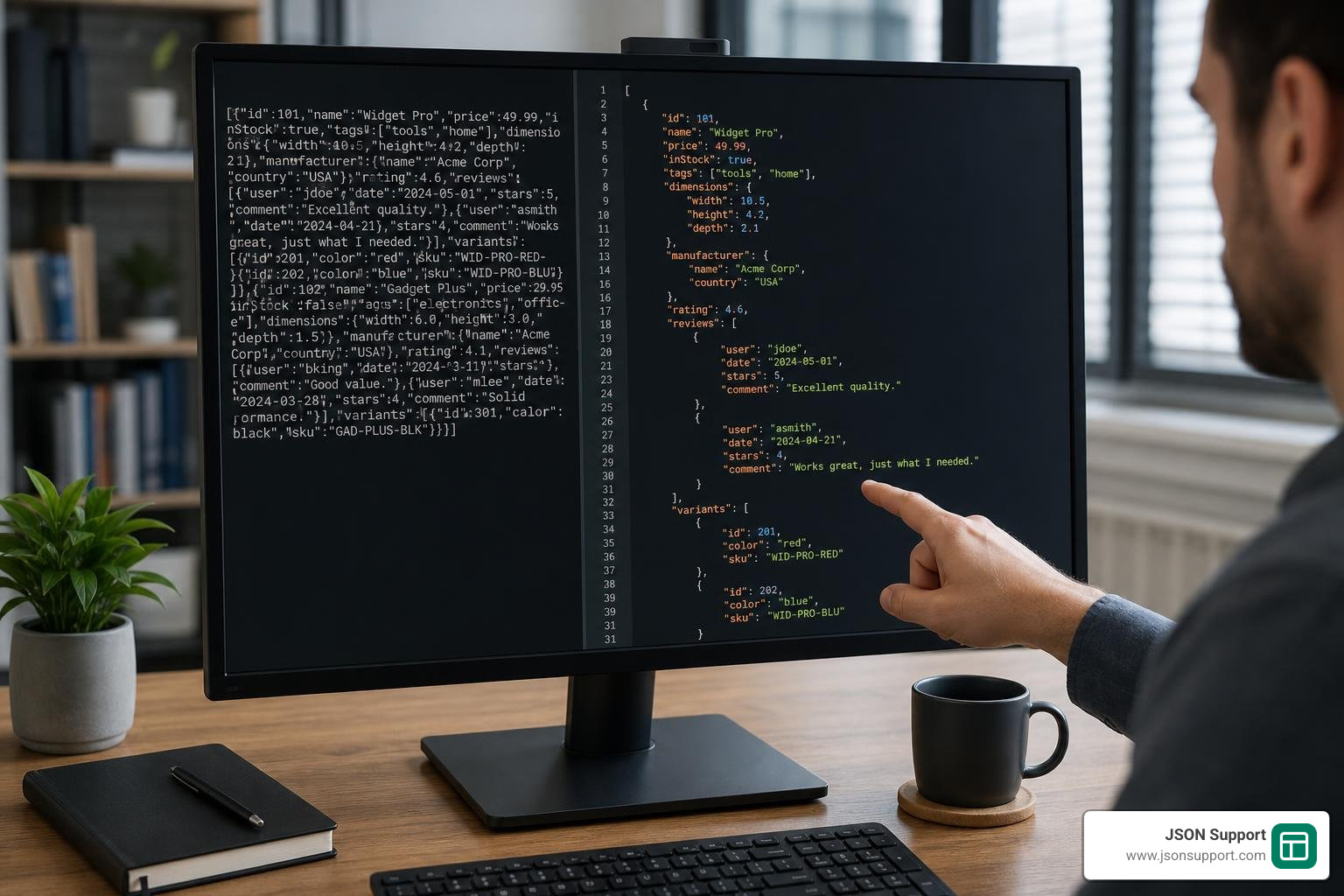
A json format reader is the fastest way to turn a wall of unreadable machine-generated text into clean, structured data you can actually understand.
If you just need a quick answer, here are the most common ways to read and format JSON:
| Method | Best For | Requires Coding? |
|---|---|---|
| Online JSON viewer/formatter | Quick formatting, no setup | No |
| Browser built-in viewer (e.g., Edge Pretty-print) | Viewing local or API JSON files | No |
Python json.loads() |
Programmatic parsing and automation | Yes |
| Mobile JSON viewer app | On-the-go inspection | No |
| JSON-to-Excel converter | Sharing data with non-technical teams | No |
Picture this: you receive a JSON API response from your company's data team. It's one long, unbroken line of text — thousands of characters with no spaces, no line breaks, no structure you can follow. You need to pull out a few key fields for a report. Where do you even start?
This is the everyday reality for analysts, product managers, and anyone who works with app data or API outputs. JSON is designed to be read by machines, not people. Without a reader or formatter, it's close to useless for human analysis.
The good news? You don't need to write a single line of code to fix it.
JSON (JavaScript Object Notation) is a lightweight, text-based data interchange format — the standard language that web services use to send data back and forth. It's everywhere: API responses, configuration files, database exports, even government tax documents. But in its raw, minified form, it's nearly impossible to read.
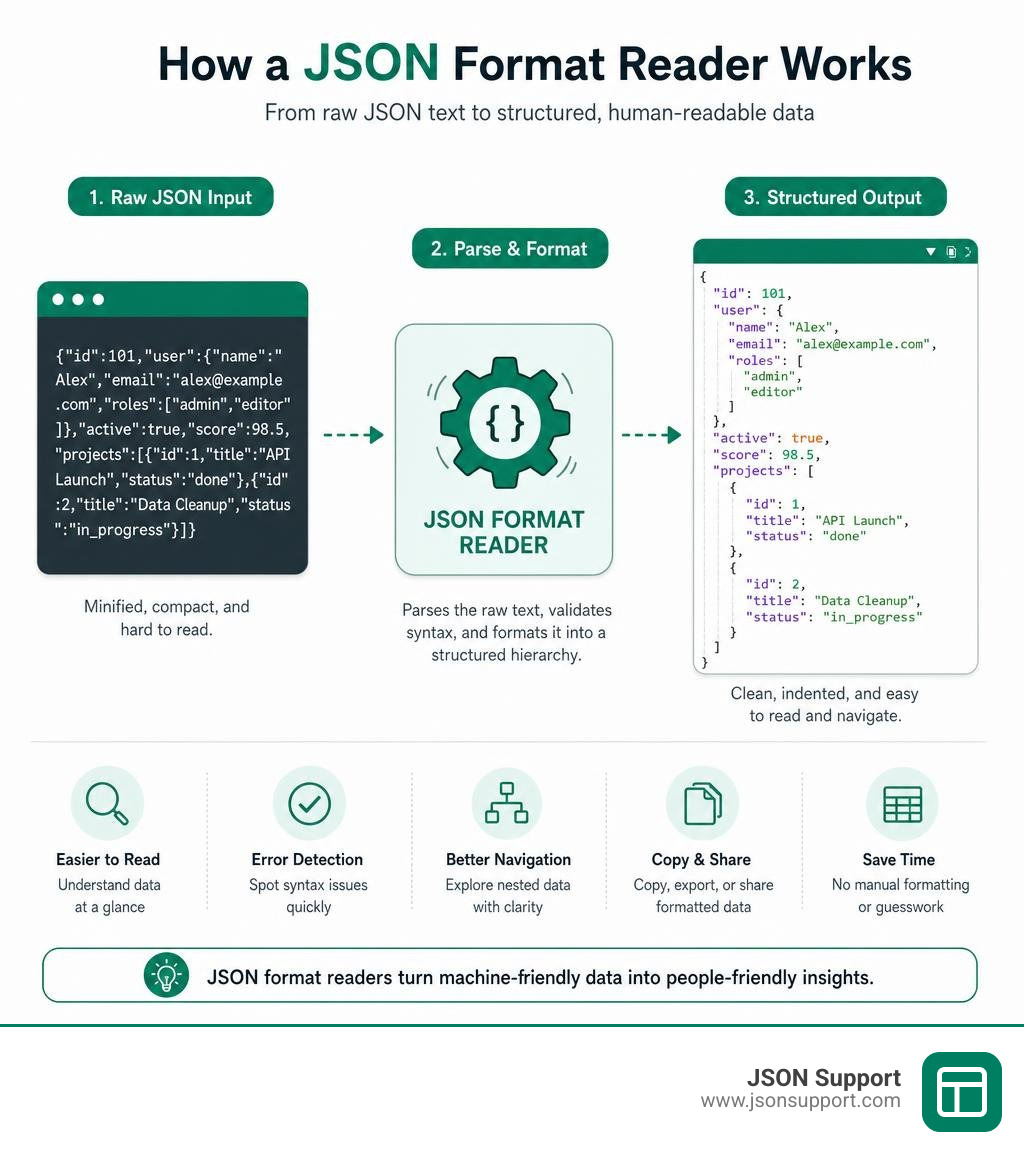
A JSON format reader parses that raw text and renders it in a clean, hierarchical structure — making it easy to spot the data you need, catch errors, and share results with your team.
What is JSON and Why Do We Need a json format reader?
At its core, JSON is built on the formal ECMA-404 standard (and specified by RFC 8259). This standard defines a strict set of rules for structured data interchange. While it was originally inspired by JavaScript object literal syntax, JSON is entirely language-independent. This means whether your backend is written in Python, Java, C++, or Go, they can all agree on how to read and write JSON.
We need a dedicated json format reader because modern software systems prioritize performance over human readability. When an API transmits data, it minifies the payload. Minification strips away all unnecessary whitespace, comments, and line breaks to reduce file sizes and save bandwidth. A 128KB minified file might save crucial milliseconds over the network, but opening it in a standard text editor is a nightmare.
To bridge this gap, a reader parses the tokens of the minified string and reintroduces indentation, colors, and collapsible tree structures. If you are new to this format, you can explore our What is JSON? A Beginner's Guide to understand how it became the undisputed king of web data exchange.
Core Data Types and Structures in JSON
The JSON specification is beautifully simple. It defines only two structural patterns and six basic data types. A compliant json format reader must identify and validate each of these elements:
- Objects: An unordered collection of key-value pairs wrapped in curly braces
{}. Keys must always be strings wrapped in double quotes, followed by a colon, and separated by commas. - Arrays: An ordered list of values enclosed in square brackets
[]. Values can be of any data type, including nested objects or other arrays. - Strings: A sequence of zero or more Unicode characters wrapped in double quotes
"". - Numbers: Double-precision floating-point numbers. JSON does not distinguish between integers and decimals.
- Booleans: The literal values
trueorfalse(always lowercase). - Null: The literal value
nullto represent an empty or missing value.
By nesting objects and arrays inside one another, developers can represent highly complex, hierarchical relationships — such as a customer record containing a nested list of physical addresses and phone numbers.
Common Syntax Errors Caught by a json format reader
Because the JSON specification is so strict, even a single misplaced character will cause a parser to crash. A good json format reader acts as a validator, instantly highlighting syntax violations. Some of the most common errors include:
- Trailing Commas: Adding a comma after the final item in an array or object (e.g.,
[1, 2, 3,]or{"a": 1,}). While allowed in JavaScript and Python, this is strictly forbidden in JSON. - Missing or Single Quotes: Using single quotes
'key'or omitting quotes entirelykeyfor object keys. JSON strictly requires double quotes""for all keys and strings. - Unescaped Control Characters: Control characters (like tabs or newlines) inside strings must be properly escaped (e.g., using
\nor\t). - Duplicate Keys: Having the same key name twice within the same object (e.g.,
{"id": 1, "id": 2}). While some lenient parsers will simply overwrite the first value and keep the last one, strict readers will flag this as a risk to data integrity.
Programmatic JSON Parsing: Streaming vs. Tree-Model Readers
When you are not using a visual tool, you will likely read JSON programmatically within an application. This is where programmatic parsers come into play. They handle serialization (converting an in-memory object into a JSON string) and deserialization (reading a JSON string back into an in-memory object).
Programmatic readers generally fall into two categories, each suited for different use cases:
| Feature | Streaming Readers (e.g., Gson's JsonReader) | Tree-Model Readers (e.g., javax.json.JsonReader) |
|---|---|---|
| Memory Footprint | Extremely low (reads token-by-token) | High (loads the entire structure into memory) |
| Parsing Speed | Fast for sequential access | Slower initial load, fast random access |
| Ease of Use | Complex (requires manual state tracking) | Simple (provides a direct, intuitive object tree) |
| Best For | Massive files, network streams, API gateways | Small to medium configuration files, rapid prototyping |
Reading JSON in Python, Java, and C++
Let's look at how popular programming languages handle parsing. That when writing code, you should always handle potential exceptions to prevent your application from crashing due to malformed data.
In Python, the built-in json module is the standard choice. You can parse a JSON string using json.loads() or read a file using json.load(). To explore how Python can process and convert this data further, check out our guide on How to Convert JSON to CSV in Python. For detailed library behaviors, consult the official json — JSON encoder and decoder — Python 3.14.6 documentation.
In Java, enterprise applications often rely on the standard Java EE (now Jakarta EE) JSON Processing (JSON-P) API. This API defines the javax.json.JsonReader interface. You can inspect the interface structure directly in the api/src/main/java/javax/json/JsonReader.java source code. To read an object, you instantiate the reader and call readObject() or readArray().
For C++ developers, the open-source JsonCpp library is a popular choice. It provides a robust parsing architecture through its CharReader and CharReaderBuilder classes. You can review the parser's header implementation details in the include/json/reader.h at master · open-source-parsers/jsoncpp repository.
Streaming Readers vs. Tree-Model Readers
To understand why streaming readers are so powerful, we can look at Google's Gson library. The streaming reader, com.google.gson.stream.JsonReader, reads JSON as a sequential stream of tokens. You can examine its low-level implementation in the gson/src/main/java/com/google/gson/stream/JsonReader.java at master · google/gson source code.
When using Gson's streaming reader, you call methods like beginArray(), nextName(), and endObject() to consume tokens one by one. This approach keeps the memory footprint incredibly low because the parser never holds the entire JSON tree in memory. However, to prevent denial-of-service (DoS) attacks via deeply nested payloads, Gson enforces a default nesting limit of 255. You can learn more about these configuration options in the JsonReader (Gson 2.11.0 API) documentation.
Conversely, tree-model readers like javax.json.JsonReader load the entire JSON structure into memory as an immutable tree of JsonObject and JsonArray nodes. While this is incredibly convenient for developers who want to jump directly to a specific nested value, it can easily exhaust system memory when dealing with large datasets. For more details on the tree-model specification, refer to the JsonReader (JSON Processing API documentation).
Advanced JSON Operations: Large Files, Security, and Format Conversion
As your applications scale, simply reading and displaying JSON is no longer enough. You must also consider performance bottlenecks, security risks, and how to convert your data into business-friendly formats.
Managing Large Files Without Memory Crashes
What happens when you need to read a JSON file that is several gigabytes in size? If you try to open it in a standard text editor or parse it with a tree-model reader, your application or browser will likely crash due to memory exhaustion.
To handle large datasets efficiently, developers use streaming formats like NDJSON (Newline Delimited JSON). NDJSON splits a massive dataset into individual, valid JSON objects separated by newline characters. This allows your json format reader to parse the file line-by-line, keeping memory usage constant regardless of the total file size. You can read all about this approach in our article What is NDJSON. While some advanced online editors can process files up to 512 MB directly in the browser, local streaming scripts remain the gold standard for multi-gigabyte datasets.
Security Risks of Using an Online json format reader
When you copy and paste your JSON data into a third-party online tool, you must consider where that data is going. If your JSON contains sensitive API keys, customer databases, proprietary code, or financial records, uploading it to a server-side online tool presents a massive privacy risk. Many traditional online formatters store your inputs in databases or logs.
Furthermore, processing JSON from untrusted sources carries technical risks. For example, malicious actors can exploit JSON parsers using deeply nested structures to trigger stack overflows. In web applications, private JSON responses can sometimes be vulnerable to Cross-Site Request Forgery (CSRF) script execution. To mitigate this, some frameworks prefix JSON payloads with non-execute characters like )]}' to make the file malformed and unexecutable by HTML script tags.
To protect your privacy, we highly recommend using serverless, client-side tools. For example, our platform processes all data locally inside your browser using JavaScript. No data is ever sent to an external database, ensuring your sensitive information remains entirely private.
Converting JSON to CSV, Excel, and Other Formats
JSON is the perfect format for systems to communicate, but it is not built for human business analysis. If you try to hand a raw, nested JSON file to a marketing manager or financial analyst, they won't be able to make heads or tails of it. They need spreadsheets.
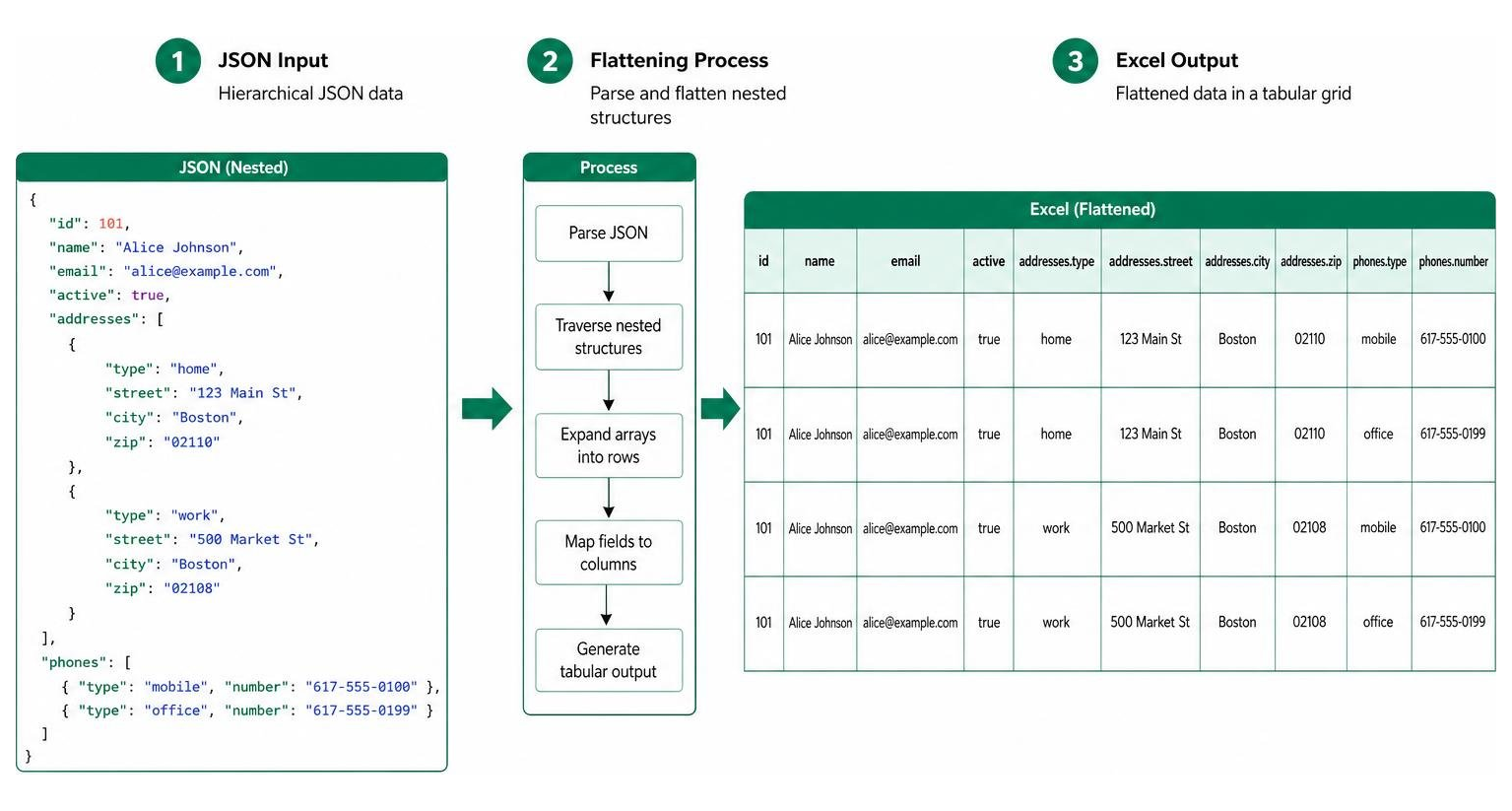
Converting JSON to tabular formats like CSV or Excel requires flattening the data. Since JSON is hierarchical (nested) and spreadsheets are two-dimensional (rows and columns), the converter must map nested properties to flat columns. For instance, a nested object like {"user": {"name": "Alice"}} must be flattened using dot notation into a column header named user.name.
To learn how to handle these conversions step-by-step, you can explore our comprehensive guides:
- How to Convert JSON to CSV
- How to Convert JSON to CSV for Better Data Analysis
- How to Convert JSON to Excel: A 2026 Guide
Frequently Asked Questions about JSON Readers
To help you get the most out of your workflows, we have compiled answers to some of the most common questions about reading and troubleshooting JSON data.
Can I open a JSON file directly in Excel without a tool?
Yes, but it is not always a straightforward process. Modern versions of Microsoft Excel include a tool called Power Query, which can import and parse JSON files. However, this requires a manual, multi-step setup. You have to open Excel, navigate to the Data tab, select "Get Data", choose "From File", select "From JSON", and then manually expand the nested records and lists into columns.
For quick tasks or non-technical team members, this manual process is often too complex and time-consuming. Using a dedicated, instant converter is usually the faster and more reliable choice.
What is the difference between strict and lenient JSON parsing?
Strict parsing adheres strictly to the official RFC 8259 and ECMA-404 specifications. Under strict parsing, any non-compliant syntax — such as comments, single quotes, unquoted keys, or trailing commas — will immediately throw an exception and halt the process.
Lenient parsing (often enabled by setting a parser's strictness level to lenient) allows the reader to tolerate common non-standard syntax. For example, a lenient parser might ignore JavaScript-style comments, accept single quotes, or automatically skip unrecognized properties without crashing. While lenient parsing is convenient for reading hand-written configuration files, strict parsing is highly recommended for production APIs to ensure strict data validation and security compliance.
How do I troubleshoot and repair malformed JSON data?
When your json format reader flags an error, troubleshooting is all about locating the exact character that broke the rules. Here is a quick checklist to repair your data:
- Check the line number: Most visual readers will highlight the exact line where the parser failed.
- Look for missing double quotes: Ensure every single key and string value is wrapped in double quotes
"". - Check your commas: Verify that all items in an array or object are separated by commas, and make sure there is no trailing comma after the last item.
- Validate brackets: Ensure every opening curly brace
{has a matching closing brace}, and every square bracket[has a matching]. - Use an auto-repair tool: Some advanced editors feature smart formatting that can automatically insert missing quotes or strip out trailing commas for you.
Conclusion
Whether you are a software engineer debugging a complex API response, a data analyst processing database exports, or a business manager trying to make sense of a system log, a reliable json format reader is an indispensable tool in your modern workflow. Understanding how JSON structures data, recognizing common syntax errors, and choosing the right parsing method can save you hours of manual frustration.
As we have explored, keeping your data secure and private is paramount. While there are countless online formatters available, many of them risk exposing your sensitive payloads to external databases.
At JSON Support, we are committed to making your data workflows both effortless and secure. We offer a free, browser-based JSON Support conversion tool that operates in a completely serverless, data-less environment. This means your files are processed entirely within your local browser — ensuring instant, private, and registration-free conversions to Excel without ever risking your data privacy. Stop squinting at messy, nested code and start transforming your JSON into clean, analysis-ready spreadsheets in seconds!