Why So Many People Need to Convert JSON Online
July 22, 2026

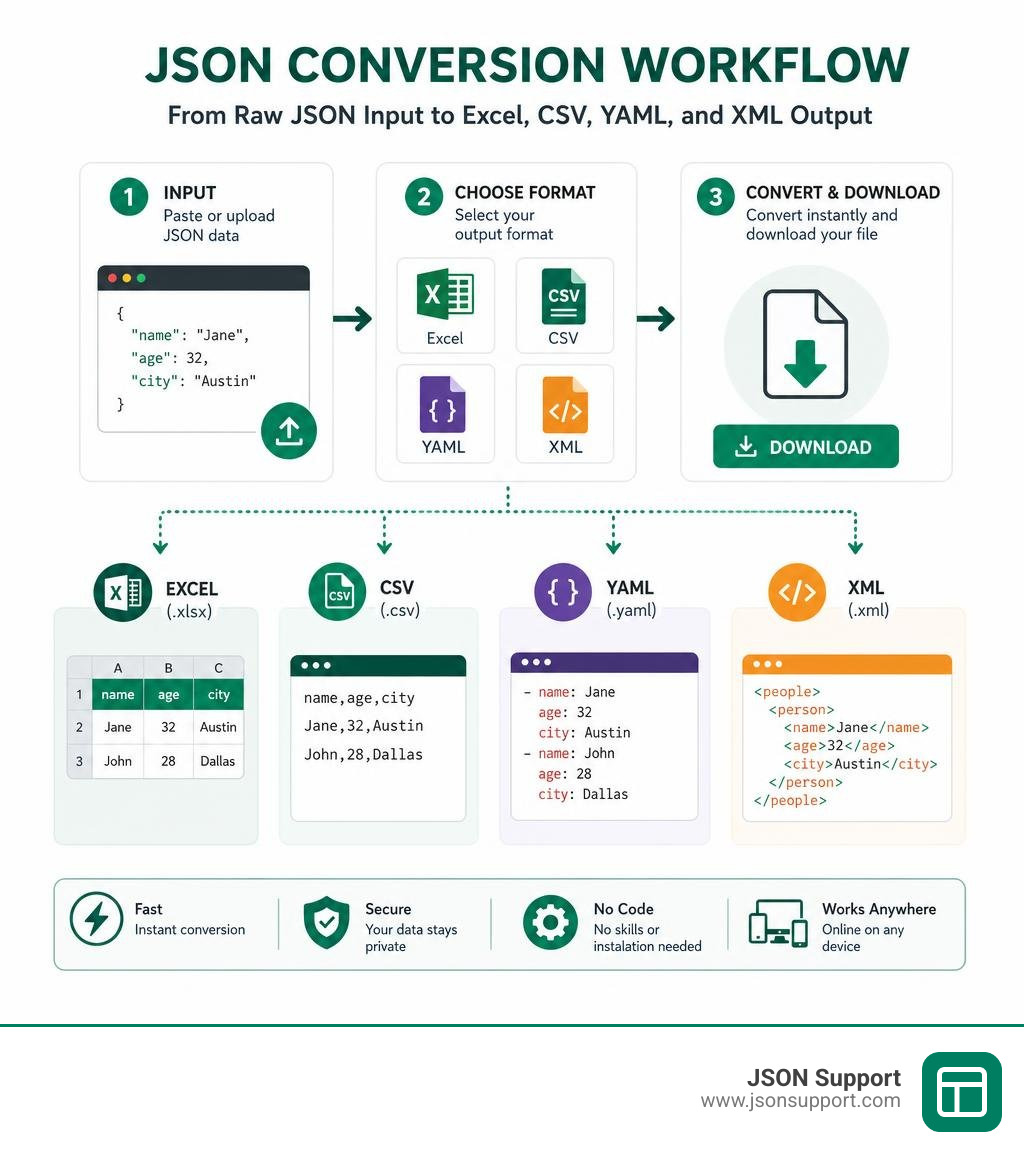
If you need to convert JSON online, you're in the right place. Here's the fastest answer:
How to convert JSON online in 3 steps:
- Paste or upload your JSON data into an online converter tool
- Choose your output format — Excel (.xlsx), CSV, YAML, XML, or others
- Click Convert and download your file instantly — no coding or registration needed
JSON is everywhere. Around 95% of APIs use it to move data between systems. That means analysts, product managers, and business teams are constantly receiving JSON files they can't easily read or use.
The problem? JSON looks like this:
{"name":"Jane","age":32,"city":"Austin"}
Excel looks like a clean, readable spreadsheet. For most business users, there's a big gap between the two.
That's exactly what online JSON converters solve. They let you take raw, machine-readable JSON data — from API responses, database exports, or app logs — and turn it into a format you can actually work with. No Python scripts. No Excel Power Query setup. No software to install.
This guide walks you through the whole process, step by step.
What It Means to Convert JSON Online
At its core, to convert JSON online means taking a serialized, text-based data interchange format (JSON) and translating its structure into another data format without needing to write custom parsing code.
When software programs talk to each other across web services, they do not send spreadsheets. Instead, they serialize data into lightweight, text-based formats. To understand why this is the industry default, you can read our guide on What is JSON? A Beginner's Guide to the Data Format.
While serializing data into JSON is incredibly efficient for web servers, it is highly impractical for human evaluation. When you receive raw API responses from modern web services, you are looking at a giant, unformatted string of text nested with curly braces, square brackets, colons, and commas. Converting this data online allows you to instantly restructure these complex nested hierarchies into flat tables, markup schemas, or programming language objects.
How to Convert JSON to Excel and CSV
For most professionals, the primary goal of converting JSON is to turn raw data into a tabular format that is ready for spreadsheet applications. Whether you are prepping a marketing list, auditing financial records, or analyzing system logs, spreadsheets remain the ultimate tool for business reporting.
However, before you hit convert, you should understand the structural difference between the two main spreadsheet formats. For a deeper look, check out our comparison on Converting JSON to Excel vs CSV: Which Should You Use.
To ensure your conversion is seamless, we have broken down the entire process into three simple, practical steps.
Step 1: Prepare and Validate Your Data
Before trying to convert your data, you must ensure that your JSON is syntactically correct. If your source text has missing brackets, unescaped quotes, or stray commas, the parser will throw an error and halt the conversion.
We recommend running your text through a syntax check or validation tool to verify its integrity against the official RFC 8259 specifications. This ensures that your keys and values conform to universal standards.
Additionally, you should check if your data is formatted as standard JSON (a single massive array or object) or if it is structured as NDJSON (Newline-Delimited JSON). If you are dealing with log streams or database dumps, you might be working with NDJSON, which requires a slightly different handling approach. You can learn more about this in our guide: What is NDJSON.
Step 2: Choose Your Target Format and Convert JSON Online
Once your data is validated, you need to decide between generating a flat CSV file or a fully formatted Excel (.xlsx) sheet.
If you choose Excel, you can use our dedicated tool to handle the heavy lifting. For a comprehensive walkthrough of this method, check out How to Convert JSON to Excel: A 2026 Guide.
Our online converter supports direct file uploads for datasets up to 10MB. Once you upload your file, the conversion happens instantly, and you can download your clean spreadsheet with a single click.
Step 3: Handle Nested Objects and Download Your File
The trickiest part of converting JSON to a spreadsheet is dealing with nested structures. JSON is hierarchical, meaning an object can contain other objects or lists. Spreadsheet tables, on the other hand, are strictly two-dimensional (rows and columns).
To bridge this gap, online converters use a process called "smart flattening."
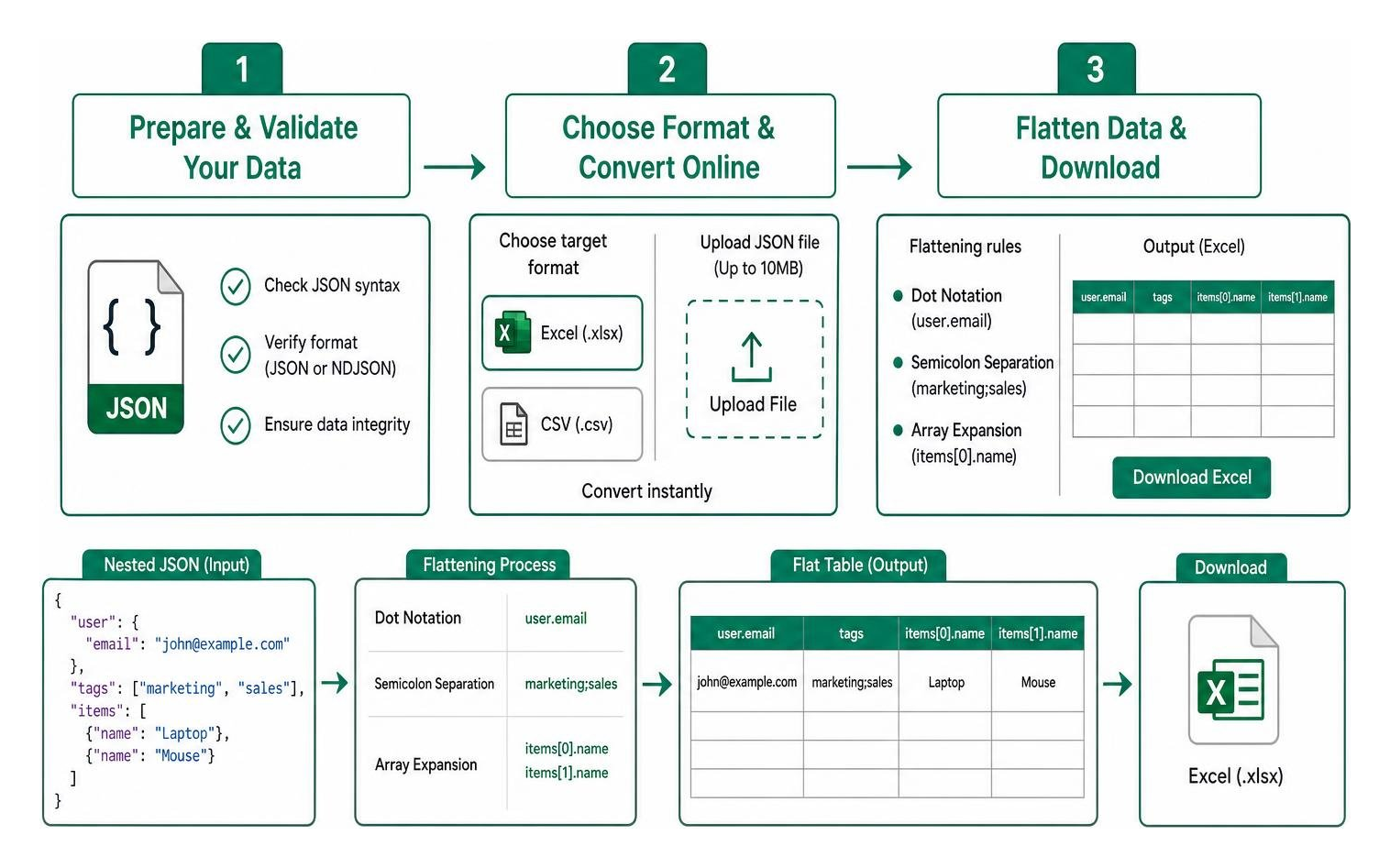
- Dot Notation: Nested objects are flattened by joining parent and child keys with a dot. For example, if you have a parent key called "user" containing a child key called "email", the converter will automatically create a column header named "user.email".
- Semicolon Separation: If a key contains a simple array of primitive values, like a list of tags such as "marketing" and "sales", the converter will bundle them into a single cell separated by semicolons.
- Array Expansion: For complex arrays of objects, the converter will expand them into multiple indexed columns, such as "items[0].name" and "items[1].name", ensuring no data is lost.
For more details on how this flattening process works for different spreadsheet types, read our in-depth guides on How to Convert JSON to CSV and How to Convert JSON to CSV for Better Data Analysis.
Converting JSON to Other Formats: YAML, XML, SQL, and Code

Here is a quick comparison of the most common target formats you might need when you convert JSON online:
| Format | Primary Use Case | Human Readability | Nested Data Support | Comments Supported |
|---|---|---|---|---|
| Excel (.xlsx) | Business analysis and reporting | Excellent (for non-technical users) | No (requires flattening) | Yes |
| CSV | Lightweight data transfer | Moderate | No (requires flattening) | No |
| YAML | DevOps, CI/CD, configuration files | Excellent | Yes | Yes |
| XML | Enterprise systems, legacy APIs | Poor | Yes | Yes |
How to Convert JSON Online to YAML or XML
YAML and XML are highly structured formats that support nested data naturally, meaning you do not have to flatten your objects during conversion.
YAML is the darling of the DevOps world. In fact, major platforms like Kubernetes and GitHub Actions standardized on YAML primarily because it supports code comments, which JSON lacks. When converting JSON to YAML, you can choose between "block style" (highly readable with indentation) or "flow style" (compact, inline style). If you need to convert configurations bidirectionally, you can use a browser-based converter that runs entirely in your browser and lets you edit either side in real time.
XML, while older and more verbose, remains a requirement for many legacy enterprise systems. Converting JSON to XML wraps your data keys in markup tags, transforming {"status":"active"} into <status>active</status>.
Generating TypeScript, SQL, and Programming Structures
If you are a developer, you often need to map raw JSON payloads directly into strongly-typed code structures. Online converters can analyze your JSON data and instantly generate:
- TypeScript Interfaces: Automatically infers types (string, number, boolean) to build clean interfaces.
- Go Structs: Generates structured models with pre-configured JSON tags.
- Pydantic Models: Creates Python data validation models.
- SQL Insert Statements: Turns an array of JSON objects into a series of SQL INSERT statements, mapping keys to database columns.
If you are working with Python and want to build your own custom data pipeline instead of using an online tool, you can follow our tutorial on How to Convert JSON to CSV in Python.
Bidirectional Conversions: Reverting Back to JSON
Data flows both ways. Just as you need to convert JSON to other formats, you will often need to parse CSV, XML, or YAML files back into clean JSON payloads.
For instance, when business teams finish editing an Excel spreadsheet, that data must be converted back into a JSON array of objects before it can be uploaded to a modern web API. Reverting data back to JSON requires mapping flat, dot-notated columns back into nested objects, ensuring that your application receives the exact nested schema it expects.
Security, Limitations, and Best Practices for Online Converters
While online converters are incredibly convenient, pasting data into arbitrary websites carries risks. You must balance convenience with security, especially when working with production databases or proprietary business records.
Are Online JSON Converters Safe for Sensitive Data?
The short answer is: it depends on how the tool is built.
Many traditional online converters upload your files to their servers, process the conversion backend, and then let you download the result. This means your private data — which might include customer emails, financial figures, or security tokens — is temporarily stored on a third-party server.
At JSON Support, we do things differently. Our conversion tools operate on a 100% client-side, serverless architecture. This means your JSON data never leaves your computer. The conversion script runs directly inside your local browser memory. Because there is no backend database and no external server calls, your data remains completely private, secure, and under your control.
Overcoming File Size Limits and Complex Nesting
Browser-based conversion tools are fast, but they are limited by your device's memory.
- File Size Limits: While simple text editors can display large files, converting formats requires massive memory buffering. Online converters typically support file uploads up to 10MB for complex formats like Excel, and up to 50MB (or roughly 500,000 rows) for flat CSV conversions. If you try to parse a file larger than 512MB in a standard browser, your tab will likely crash.
- Deep Nesting: If your JSON has dozens of nested levels, flattening it into a spreadsheet will create incredibly wide tables with hundreds of dot-notated columns. For extremely large or deeply nested datasets, we recommend using dedicated command-line tools like "jq", "Miller", or custom Python scripts.
Troubleshooting Invalid JSON and Syntax Errors
If your conversion fails, it is almost always due to syntax errors in your source file. Here are the most common culprits:
- Trailing Commas: Having a comma after the last item in an array or object (e.g.,
{"name": "Alice",}). - Missing Quotes: Keys or string values that are not wrapped in double quotes.
- Mismatched Brackets: Forgetting to close a curly brace
{or square bracket[. - Unescaped Characters: Having raw tab characters or unescaped double quotes inside a text string.
Most modern online tools include an automated "fixer" or syntax highlighter that points directly to the line containing the error, allowing you to repair the structure before running the converter.
Frequently Asked Questions About JSON Conversion
Can I convert JSON to a visual table or grid view?
Yes! If you do not want to download a file but simply want to inspect your data, you can use a JSON grid viewer. These tools render your nested JSON arrays into interactive tables directly in your browser. This tabular layout lets you expand or collapse specific nodes, making visual inspection much easier than reading raw text.
What is the difference between formatting and converting JSON?
Formatting (also called "beautifying" or "pretty-printing") does not change the data format. It merely adds indentation, line breaks, and whitespace to raw JSON to make it human-readable. Minifying does the opposite — it strips out all whitespace to make the payload as small as possible for fast network transmission.
Converting, however, changes the underlying data structure entirely, translating JSON into a completely different format like Excel, XML, or YAML.
What is the maximum file size for online JSON conversion?
For local, client-side tools executing in your browser, the practical limit is usually 10MB for Excel generation and up to 50MB for CSV files. This threshold exists because generating binary spreadsheet files (.xlsx) is highly CPU and memory-intensive for web browsers.
Conclusion
Converting JSON does not have to be a headache. Whether you are a business analyst trying to make sense of an API response, or a developer prepping a configuration file, online conversion tools bridge the gap between machine-readable structures and human-friendly formats.
If you are looking for a fast, secure, and hassle-free way to turn your JSON files into ready-to-use spreadsheets, try our free converter at JSON Support. Our serverless tool processes all your data locally in your browser, ensuring absolute privacy, instant downloads, and zero registration requirements.