What Is a JSON Viewer and Why Do You Need One?
July 22, 2026

A JSON viewer is a tool that transforms raw, hard-to-read JSON data into a clean, structured format you can actually understand — no coding required. JSON Support's own JSON viewer is exactly this kind of tool: paste in raw JSON and get it instantly pretty-printed and validated, entirely in your browser.
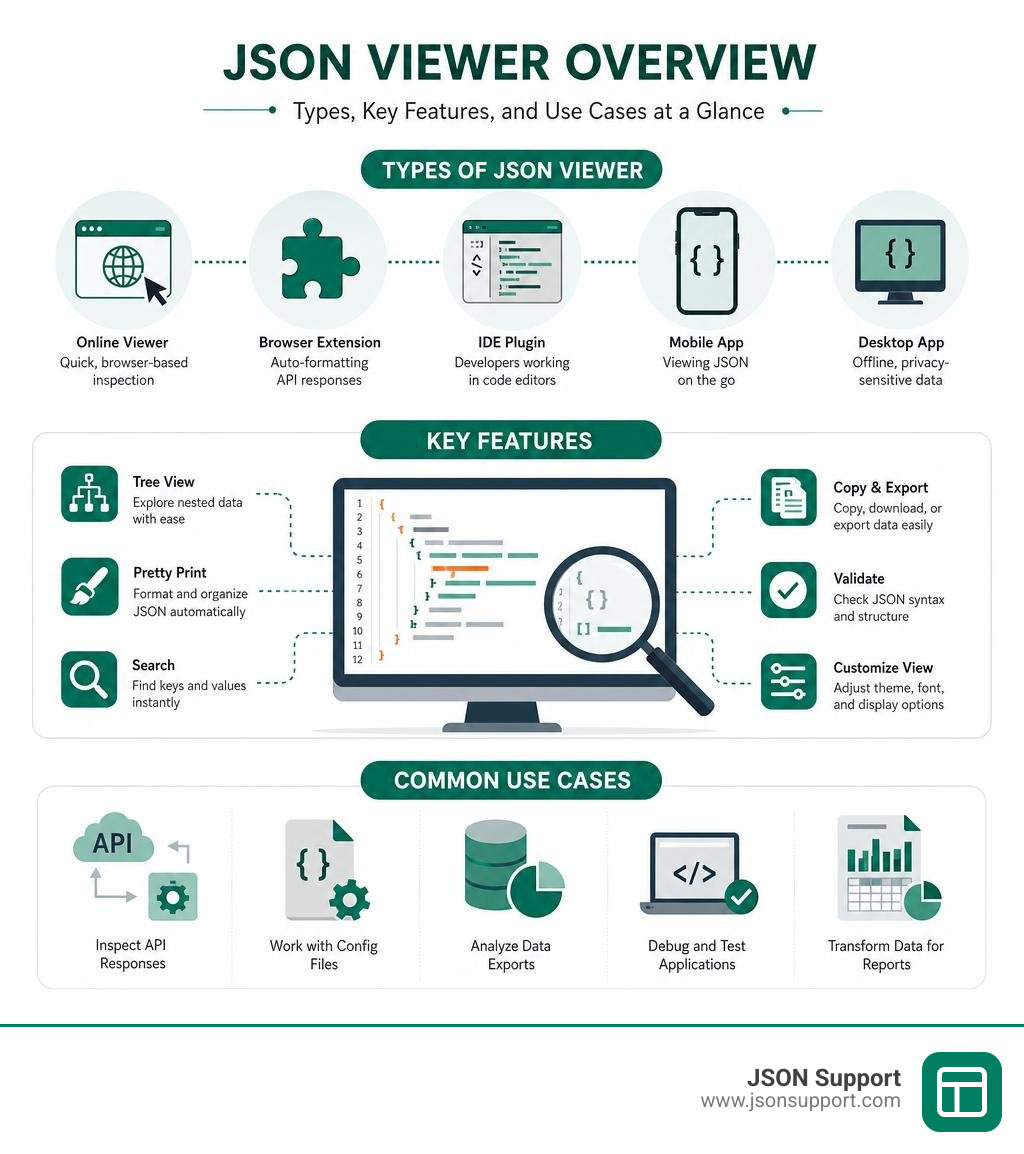
Quick answer: Here are the most common ways to view JSON data:
| Tool Type | Best For | Example |
|---|---|---|
| Online JSON viewer | Quick, browser-based inspection | Paste and view instantly |
| Browser extension | Auto-formatting API responses | JSON Viewer Pro |
| IDE plugin | Developers working in code editors | VS Code built-in formatter |
| Mobile app | Viewing JSON on the go | Json Genie (Android) |
| Desktop app | Offline, privacy-sensitive data | JSON Viewer & Editor (iOS) |
If you work with API responses, config files, or data exports, you have almost certainly stared at something like this:
{"id":1,"name":"Alice","address":{"city":"London","zip":"EC1A"}}
That is valid JSON. But it is nearly impossible to read at a glance — especially when it spans hundreds or thousands of lines. A JSON viewer solves that instantly by laying the data out visually, often as an expandable tree where you can drill into nested values one level at a time.
JSON — short for JavaScript Object Notation — is the standard format that most modern apps and APIs use to exchange data. It is lightweight, text-based, and technically human-readable. The problem is that real-world JSON is rarely pretty. APIs strip out whitespace to save bandwidth, leaving you with a single unbroken wall of text. Without a viewer, making sense of that data means squinting at raw brackets and commas.
For analysts who receive JSON exports or API payloads and need to turn them into reports, a good JSON viewer is often the first step before converting that data into something like Excel or CSV.
Key Features to Look For in a Modern JSON Viewer
When you are hunting for the perfect json viewer, you will quickly realize that not all tools are created equal. A basic tool might just add line breaks and spacing (often called "pretty printing" or formatting), but a truly robust viewer offers features that actively help you explore and understand your data.

Here are the essential features we recommend looking for in a modern viewer:
- Interactive Tree View Navigation: This is the bread and butter of any good visualizer. Instead of scrolling through thousands of lines of text, a tree view lets you expand or collapse nested objects and arrays. If you are dealing with a massive dataset, you can keep the noise collapsed and only open the specific branches you need to inspect.
- Real-Time Syntax Validation: There is nothing more frustrating than pasting data into a tool only for it to fail silently. A great viewer includes real-time syntax checking. It will flag missing double quotes, trailing commas, or unmatched brackets, telling you exactly which line is broken so you can repair it. To better understand how these structures are defined, check out our guide, What is JSON? A Beginner's Guide to the Data Format.
- Search and Querying (JSONPath): If you are working with a multi-megabyte file, manually expanding nodes to find a specific record is like looking for a needle in a digital haystack. You need a viewer with a built-in search bar that highlights matching keys and values. Advanced viewers even support JSONPath expressions, allowing you to run queries like
$.store.book[*].authorto instantly filter and extract specific nested elements. - Support for Diverse JSON Flavors: While standard JSON is the norm, developers frequently encounter variations. For instance, configuration files sometimes use JSONC (JSON with Comments), which allows explanatory notes. In data engineering, you might run into line-delimited data formats. To learn more about how these work, read our deep dive on What is NDJSON?.
- Developer-Friendly Customization: For those building their own internal tools, integration is key. Many modern web applications leverage lightweight, framework-agnostic web components to build custom interfaces. A great example of this is the @andypf/json-viewer npm package, which has over 10,000 weekly downloads. Because it has zero external dependencies, uses the Shadow DOM to prevent style leakage, and supports custom Base16 styling themes, it has become a go-to library for embedding clean, interactive JSON views directly into custom developer dashboards.
Comparing Different Types of JSON Tools
The right tool for you depends heavily on where your data lives and how often you need to inspect it. We can break down the landscape of JSON utility tools into four main categories, each tailored to different workflows:
| Tool Category | Best Used For | Key Advantages | Potential Drawbacks |
|---|---|---|---|
| Online Web Viewers | Quick, one-off debugging and data sharing | No installation required, accessible on any device, often includes instant format conversion | Security risks if pasting sensitive data into server-backed tools |
| Browser Extensions | Inspecting live API responses directly in the browser | Automatically formats JSON payloads in your browser tab, highly integrated with developer tools | Can slow down browser performance if handling massive files |
| IDE Plugins | Active software development and code editing | Built directly into your coding environment, respects your editor's themes and hotkeys | Requires opening a heavy desktop application |
| Mobile & Desktop Apps | Offline work, local file management, and on-the-go reviews | Extremely secure, processes data locally, handles large files efficiently | Requires installation, limited cross-platform sharing |
To see how these play out in real-world software ecosystems, we can look at some popular options available in 2026.
In the browser extension space, tools like JSON Viewer Pro have amassed over 300,000 users on the Chrome Web Store, earning a stellar 4.7 out of 5 rating from hundreds of reviews. These extensions automatically intercept raw JSON responses from web servers and render them as beautiful, interactive trees right in your browser window.
On mobile devices, developers and system administrators often need to inspect logs or configuration files on the fly. The Json Genie app on Google Play has over 5 million downloads and more than 18,000 reviews with a 4.1-star rating, proving that mobile-first tree viewers are incredibly useful for handling complex nested data on small screens. For iOS users, native tools like the JSON Viewer & Editor app offer perfect 5.0 ratings for local, offline-first viewing.
How to Choose the Right JSON Viewer for Your Workflow
When deciding which tool to adopt as your primary viewer, ask yourself these three questions:
- Where does my data live? If you are primarily inspecting API responses during web development, a browser extension or an IDE plugin is your best bet. If you are analyzing static database exports, a web-based tool or desktop app will serve you better.
- Is my data sensitive? If you are dealing with customer records, access tokens, or proprietary business data, you must prioritize offline privacy. A local desktop app, a command-line tool, or a strictly client-side, serverless web app is essential.
- How large are my files? Extremely large files can choke lightweight web tools. If you regularly open files larger than 10MB, look for tools that feature lazy rendering (only loading the parts of the tree you actively expand) or utilize command-line processors.
JSON Viewer vs. JSON Editor: What is the Difference?
While they look similar, viewers and editors serve fundamentally different purposes.
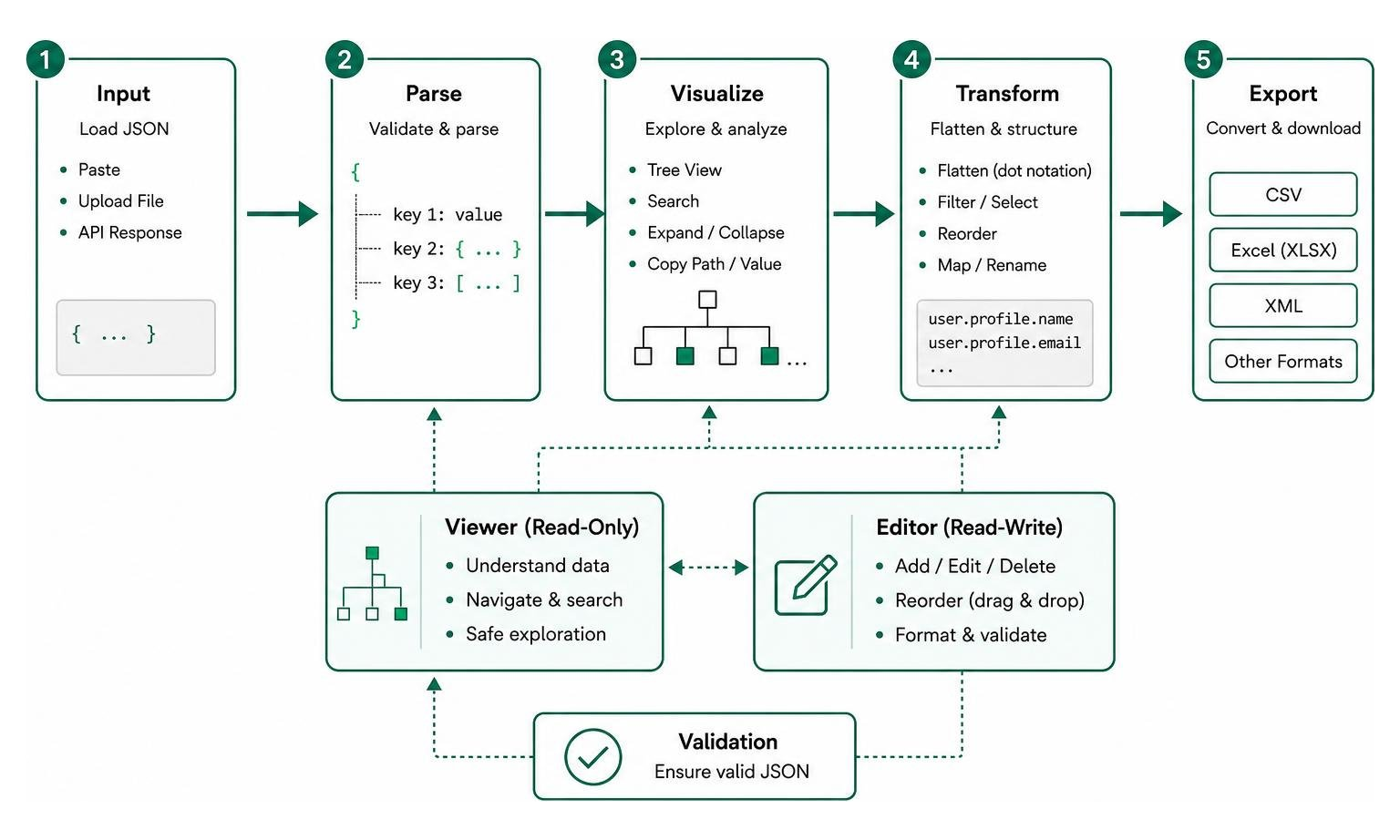
A json viewer is designed primarily for reading and understanding data. It is a read-only environment that focuses on visualization, search, and navigation. It keeps you from accidentally modifying values while you are trying to understand the structure of an API response or presenting a data payload to non-technical stakeholders.
A JSON editor, on the other hand, is built for data manipulation. It allows you to add, delete, or modify keys and values. A good editor will feature drag-and-drop structural editing (like reordering items in an array), auto-formatting upon saving, and real-time schema validation to ensure you do not save an invalid file that could crash your application.
Best Practices for Navigating and Converting Complex JSON
As datasets grow, navigating them can become overwhelming. When a file contains deeply nested arrays and objects, a standard text-based view quickly becomes unreadable.
Opening Local Files in an Online JSON Viewer
If you prefer the convenience of an online json viewer but want to work with local files, you do not have to manually copy and paste text. Most modern web-based viewers support drag-and-drop file uploads.
When you drag a .json or .txt file into a modern, privacy-first web viewer, the file is parsed locally within your browser using client-side JavaScript. This means the data never travels to a remote server, offering the perfect blend of web-based convenience and local desktop security.
Converting JSON to CSV, XML, and Excel
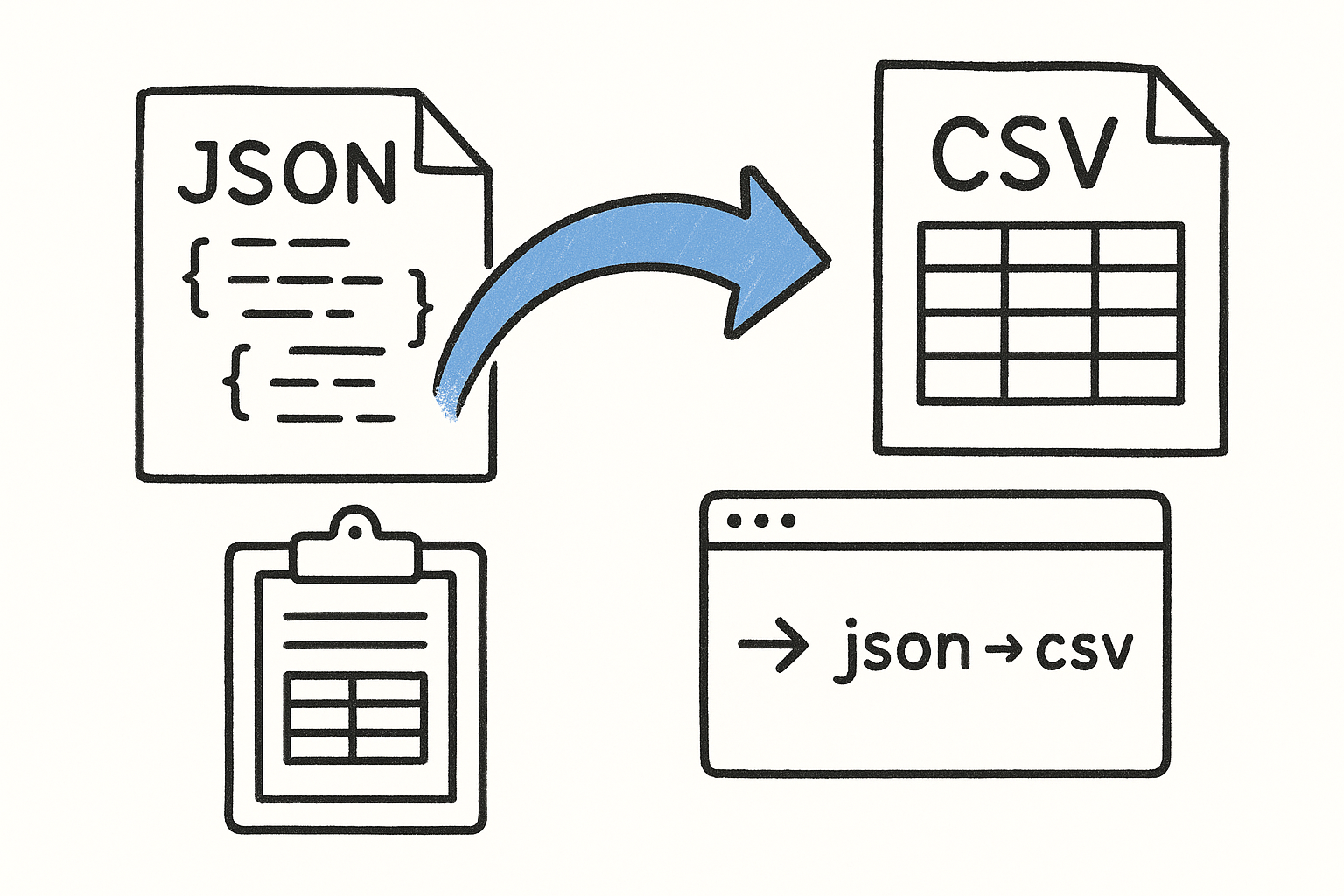
Viewing your data is often just the beginning. If you are a data analyst, business manager, or marketer, you cannot easily run pivot tables, charts, or formulas on nested JSON. You need that data in a structured, tabular format.
This is where data conversion becomes critical. Turning nested structures into flat tables requires "smart flattening." For example, if you have a nested object like:
{"user": {"profile": {"name": "Alice"}}}
A smart converter will flatten this structure using dot notation, creating a clean spreadsheet column named user.profile.name.
If you are comfortable with coding, you can write custom scripts to handle this. We have put together detailed guides on this process, including How to Convert JSON to CSV and How to Convert JSON to CSV in Python. For a broader look at how these conversions aid business intelligence, check out How to Convert JSON to CSV for Better Data Analysis.
If you want the absolute easiest path to sharing data with non-technical team members, we recommend converting your files directly into spreadsheet formats. Our comprehensive How to Convert JSON to Excel: A 2026 Guide walks you through the entire process step-by-step. For a quick, interactive way to visualize your files as an expandable tree before deciding how to export them, you can also use JSON Viewer Online - Free Interactive Tree View | JSONConvert .
Frequently Asked Questions about JSON Security and Usability
Is it safe to paste sensitive data into an online JSON viewer?
It depends entirely on how the online tool is built. Many traditional online tools send your pasted text to a backend server to format or validate it. If that server logs requests or stores your data in a database, your sensitive information (like API keys, passwords, or customer records) could be exposed.
However, modern, privacy-first tools operate entirely client-side. They use local browser JavaScript to parse, format, and display your data. Your files never leave your computer, making them completely secure. Always check the tool's privacy policy to ensure they use serverless, client-side execution.
What are the most common use cases for a JSON viewer?
JSON viewers are incredibly versatile tools used across many different roles:
- API Debugging: Developers use them to inspect raw payloads returned from REST or GraphQL APIs to ensure the server is sending the correct data.
- Inspecting Configuration Files: Many modern software applications and development environments (like VS Code) store settings in JSON. A viewer helps you check these configurations without getting lost in brackets.
- Analyzing Webhooks: When third-party services (like payment gateways) send real-time event notifications to your server, they do so via JSON webhooks. Viewers make these event payloads easy to dissect.
- Data Export Auditing: Many databases allow you to export tables as JSON. Analysts use viewers to quickly eyeball these exports to ensure the data is complete and structured correctly before importing it elsewhere.
How do you handle extremely large JSON files without crashing the browser?
Loading a 100MB JSON file into a standard browser tab will often cause the browser to freeze or crash. This is because parsing massive text strings and rendering thousands of HTML elements takes an immense amount of memory.
To handle large files without crashing, look for viewers that use lazy rendering (or virtual scrolling). These tools only generate the visual HTML nodes for the parts of the tree that are currently visible on your screen. Alternatively, for exceptionally massive datasets, it is best to use local command-line tools like jq or local Python scripts to filter and format the data before opening it in a visual viewer.
Conclusion
Whether you are a software engineer debugging a critical API, a system administrator managing server configurations, or a data analyst trying to make sense of a database export, a reliable json viewer is an indispensable part of your toolkit. It saves you from the headache of squinting at walls of raw text and lets you navigate complex, deeply nested data with ease.
At JSON Support, we believe that working with data should be simple, visual, and above all, secure. That is why we built our platform around a privacy-first, serverless architecture. When you use our tools to visualize or convert your data, everything happens directly in your browser. No registration, no databases, and no risk of your sensitive data leaving your machine.
Ready to bridge the gap between machine-readable JSON and human-friendly analysis? Head over to JSON Support and try our free, instant, and private JSON-to-Excel converter today!